The Prototyping Requirements One-Pager (PRO) is a lightweight, one-page document designed to replace bulky PRDs for rapid AI-powered development. This article covers:
Why AI-native teams use the PRO to align in a single day and iterate faster by cutting out the filler found in traditional specs.
The essential sections every PRO needs, from "Golden Paths" to specific AI considerations like latency and response tone.
Practical strategies for using your one-pager as a prompt to kick off design variations, code generation, and conversation prototyping.
Not long ago, prototyping meant sketches in Figma and a few Jira tickets. Today, AI PMs are prototyping with AI. These tools generate UI layouts, simulate user flows, and spin up concept variations before engineering ever agrees on “the real thing.”
The catch? Traditional PRDs are too heavy for this phase. The change is fast.
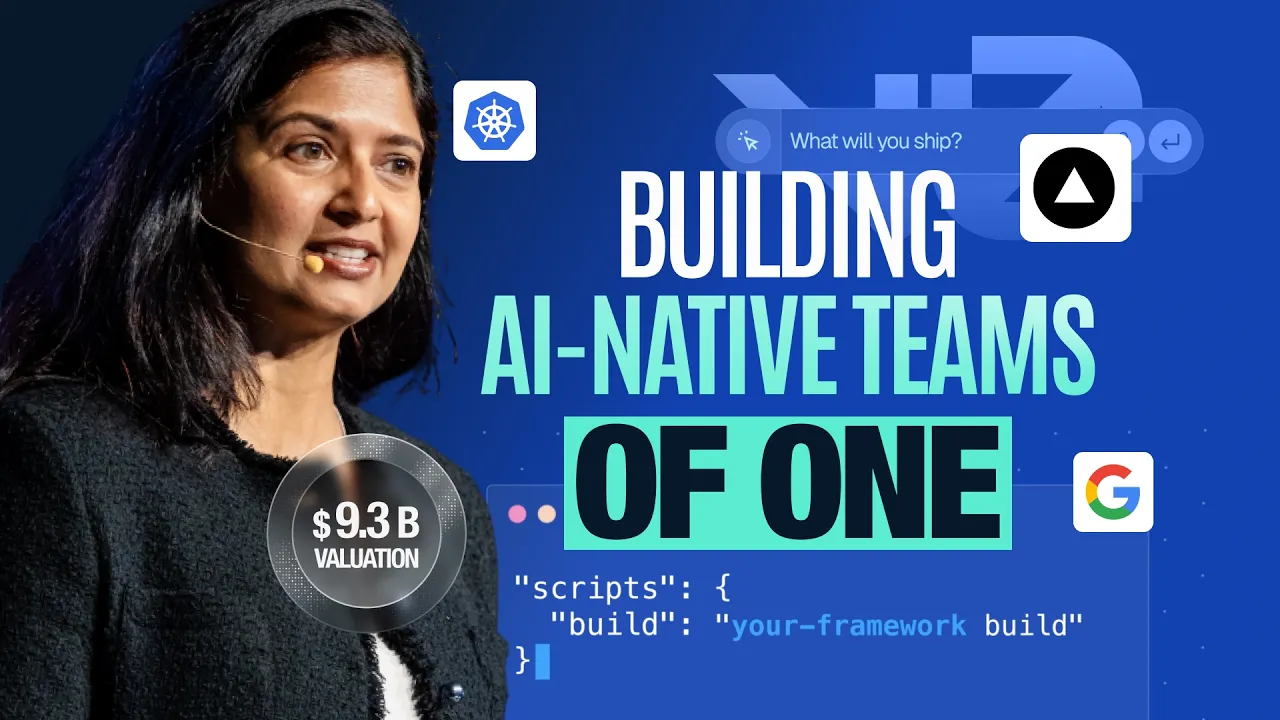
Aparna Sinha, SVP of Product at Vercel, put it bluntly on The ProductCon stage: “Building in AI is like building in an earthquake… the best model changes at any time, sometimes multiple times a day.”
What you need is a one-pager that AI can actually read right now. Enter the PRO: prototyping requirements designed for velocity, experimentation, and fast truth.
AI PRD Template
Plan, strategize, and align stakeholders around the key requirements unique to AI products.
By sharing your email, you agree to our Privacy Policy and Terms of Service
What Is a Prototyping Requirements One-Pager (PRO)?
A Prototyping Requirements One-Pager (PRO) is a brief document (typically one page) that outlines the essentials of a product idea or feature for the purpose of rapid AI prototyping. In essence, it’s a mini-spec that replaces the bulky PRD during the early prototyping phase.
The PRO distills the core problem, the proposed solution, and the key requirements into a high-level overview that anyone on the product team can quickly grasp.
Think of the PRO as the bridge between an idea and a tangible prototype. It contains just enough detail to guide product design and product development. And without the lengthy explanations and filler that often come with traditional specs.
The concept is akin to Amazon’s one-page press release (PRFAQ) approach to ideas, but tailored for prototyping needs. In practice, teams like Microsoft’s AI group have found that 20-page spec documents are already obsolete in the world of AI features.
Instead of spending weeks writing a massive PRD, teams should start with concise prompt sets or one-pagers that define “what good looks like”. Then they should immediately begin prototyping the UI and even AI interactions.
A PRO focuses on the high-impact elements: what user problem you’re solving, how the user will interact with the solution (including AI behavior if applicable), and what the prototype must demonstrate. It’s not meant to capture every detail of the final product.
Why Use a PRO Instead of a Traditional PRD?
A PRO is faster and clearer than a traditional PRD, so teams can align in a day and get to a usable prototype while a long spec is still being drafted. It also plugs directly into AI tools, which means you can turn that one page into UI mocks, user flows, and concept variations almost immediately instead of spending weeks writing and arguing over documentation.
Here’s exactly why AI-native teams always go for PRO:
It dramatically speeds up alignment and prototyping because a one-pager can be created in a day while a full PRD may take weeks.
It forces clarity by distilling the product idea down to its essentials without room for rambling or unnecessary requirements.
It improves communication since teammates can discuss a prototype anchored by a short doc rather than wading through dozens of pages.
It aligns cross-functional teams because AI PMs, product designers, and engineers can easily collaborate around a single lightweight source of truth.
It makes iteration cheaper and faster by allowing teams to update a few lines instead of rewriting large portions of a long spec.
It integrates naturally with AI tools that can convert the one-pager into mockups, flows, or code far more easily than a traditional PRD.
Traditional PRD | Prototyping One-Pager (PRO) | |
Length | Often 20+ pages; considered obsolete for AI features. | Typically one page; roughly 500 words or less. |
Goal | Capture every detail of the final product. | Outline essentials for rapid AI prototyping. |
Drafting Time | Can take weeks to finalize. | Can be created and aligned on in a single day. |
Iterative Speed | Rewriting large portions is slow and expensive. | Cheap and fast; teams update just a few lines. |
AI Utility | Bulky and hard for AI tools to digest effectively. | Plugs directly into AI tools to generate UI and code. |
Key Elements to Include in a PRO
Crafting a great PRO is about balancing brevity with substance. Here are the key elements that a prototyping one-pager should include:
1. Problem statement and goal
This section briefly describes the customer problem or need and the primary goal of the product or feature, which sets the why for the prototype.
For example, a PRO might say that customers struggle to find X, so we will prototype an AI-driven assistant to help them do Y. One or two sentences here are usually enough to frame the rest of the document.
2. Target users and use case
This identifies who the feature is for and what the core AI use case or golden path looks like. Describe the primary user story or scenario you are prototyping, including how the user will interact with the solution.
For AI features, this may include conversational interactions or AI-powered flows, and many teams explicitly list two or three golden flows to make the scenario concrete.
3. Key requirements and features
This outlines the must-have functionalities or components in the prototype at a high level. It could be three to five core features that demonstrate the idea.
For AI products, this often includes what the model should be capable of, such as understanding natural language queries or providing recommendations based on user data.
4. AI considerations (if applicable)
If the product uses AI, this section describes specifics of the AI behavior that matter during AI prototyping, such as response tone, accuracy expectations, latency, context length, or data inputs.
For example, a PRO might specify that the assistant responds in a friendly, concise tone or that responses should be generated in under two seconds. These guidelines can be used both by human teammates and by AI prompting workflows during prototyping.
5. Assumptions and constraints
This lists assumptions about user behavior, data availability, technical feasibility, or integrations, along with any constraints on the prototype.
An assumption might be that a particular API will return sample data, while a constraint could be that the prototype is only for demo purposes and not production-ready. Stating these explicitly keeps discussions grounded in what must be true for the idea to work.
6. Edge cases and risks
This section highlights potential red flags or scenarios that may challenge the prototype.
For example, what happens if the user asks the AI an unsupported question, or how the system handles missing data. Many AI-native teams pair golden paths with two or three realistic edge cases in the PRO to make risks visible before testing.
7. Success metrics or criteria
This defines how the team will evaluate the prototype’s success, whether qualitatively or quantitatively.
For general products, this might relate to task completion or clarity of user flows, while for AI products, it could include perceived usefulness, response quality, or satisfaction during a test session. Knowing what good looks like makes prototyping more disciplined and less subjective.
8. Next steps
This section describes what will happen after or during the prototyping phase. It could include user testing plans, feedback sessions, additional product experimentation, or decision points about whether to continue toward production.
Keeping the one-pager action-oriented anchors the prototype within the broader product development plan.
Using the PRO in AI-Powered Prototyping
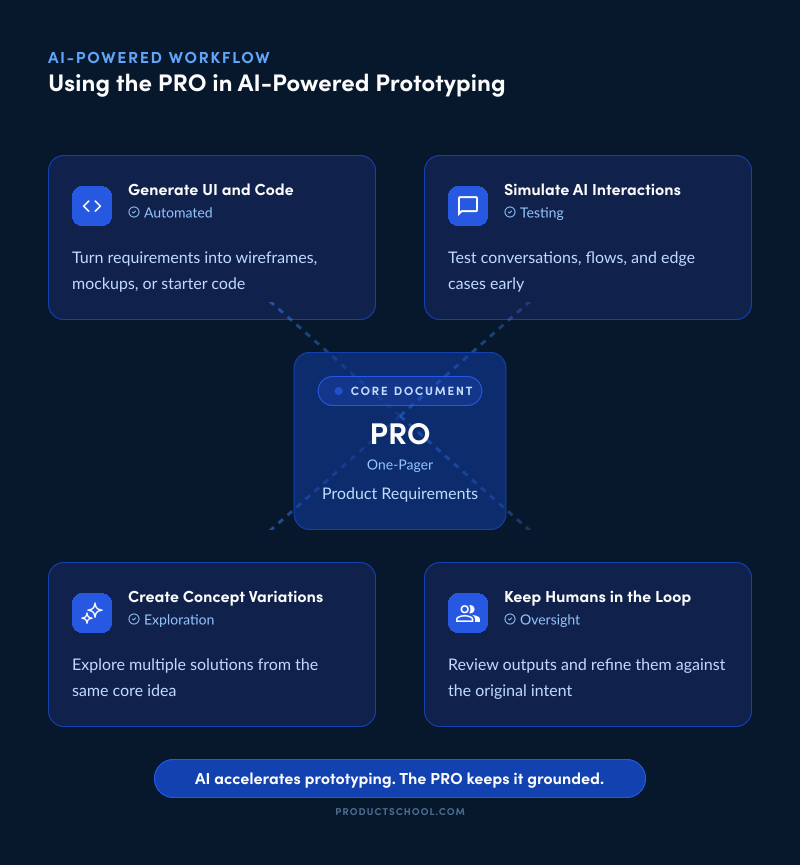
One of the biggest advantages of a PRO is that it can be directly used in AI-enhanced prototyping workflows. Because it’s concise and structured, the one-pager can serve as a prompt or blueprint for various AI tools that help build and test your product idea.
Here are ways to leverage your PRO during the prototyping process:
Generating initial UI and code from your one-pager
A well-written PRO can be fed into generative design or development tools to kick off a prototype. For example, there are AI-driven tools that take text descriptions of an app and generate user interface mockups or even working code.
With your PRO in hand, you can copy the key requirements and prompt an AI builder to create the first draft of the UI. Teams have reported using tools like Visily, Uizard, or Framer AI to turn a one-page description into wireframes or HTML/CSS mockups in minutes.
Even general AI chatbots like ChatGPT for product managers can be used to generate code when given a structured prompt. For instance, you might paste the core of your PRO and say, “Using the above product description, generate a simple React component for the main screen.” We’re now at a point where you can turn your PRD into a working prototype in minutes, and it works even better with a focused one-pager.
Some PMs literally take the text from the PRO and use it as the starting prompt to an AI coding assistant. The result might not be production-ready, but it often provides a running start.
Simulating user flows and AI interactions
If your product involves AI interactions (like a chatbot, recommendation engine, or any smart assistant feature), the PRO can guide simulations of those flows.
For example, suppose your one-pager lists a golden path: “User asks the assistant for a recommendation and the assistant suggests three options with explanations.” You can use an AI language model to role-play that interaction.
Feed the model the scenario from the PRO: one prompt as the user’s request, and see how the AI tool (playing the assistant) responds. This is a powerful way to test whether the AI behavior described in your PRO actually feels right. It’s essentially prototyping the conversation.
You can take this a step further by prototyping the “talk” alongside the interface. You can design every click and every AI response in parallel. You can do this by preparing a script of the conversation (based on PRO guidelines for tone and accuracy) and placing it next to your UI mockups.
Additionally, you can instruct an AI to simulate variations of the user input (edge cases from your one-pager) to see how the system might handle them. For instance, “What if the user asks for something outside the supported domain?” – you can prompt that and evaluate the answer.
Creating multiple concept variations rapidly
Another way to use the PRO is as a baseline to explore alternatives. Since a PRO is only one page, you can tweak a few details (or ask an AI to brainstorm) and generate multiple concept variations at virtually no cost.
For example, you might wonder if other UI approaches or feature sets could solve the same problem outlined in the one-pager? You can prompt design AI tools with different styles or layouts while keeping the core requirements constant to get a variety of mockups. Or ask ChatGPT, “Based on the above one-pager, suggest two alternative ways the user could achieve the same goal,” to inspire different solutions.
This is particularly valuable in the early stages when creativity is key. Instead of committing to one design too early, you leverage AI to diverge (producing several options) and then converge by picking the best elements.
The one-pager serves as the common anchor for all these explorations, ensuring that even the wildest variation still addresses the original problem and goal.
Keeping humans in the loop
While AI can accelerate prototyping, the PRO ensures that human insight guides the process. It’s useful to share the one-pager with your team and even stakeholders before and during the AI prototyping efforts.
This way, everyone knows what the AI is being asked to create or simulate. The PRO also makes it easier to spot if the AI-generated output strays from the intent. For instance, if an AI design tool produces a UI that looks flashy but doesn’t actually address the core use case in the PRO, the team can catch that mismatch quickly.
In this sense, the PRO keeps the AI on track by giving it a clear target to aim for.
Finally, once prototypes are generated, tested, or demonstrated, you can circle back to the PRO and update it with any new learnings. Some teams even produce a one-page summary of findings after user testing a prototype.
Tips for Creating an Effective PRO
Creating a one-pager might sound straightforward, but doing it well requires thought. Here are some best practices to ensure your PRO delivers maximum value:
1. Be concise but compelling
Aim for a single page of content (roughly 500 words or less) where every sentence earns its place. Use short paragraphs or simple bullets for clarity and get to the point quickly. Do not sacrifice inspiration because the problem and vision should still come through in a way that excites the team.
2. Use clear and user-centric language
Write the PRO in plain language that all stakeholders can understand. Focus on the user perspective with phrases like the user can or the assistant will help the user to. Avoid deep technical jargon or too much internal terminology because clarity matters even more if you plan to feed the PRO into an AI system.
3. Structure it logically
Give your one-pager a clear structure with headings for sections such as Problem, Solution, Use Cases, Features, Risks, and Next Steps.
This helps human readers and makes it easier to copy specific chunks into AI prompts. Many PRO templates follow a flow from why to what to how to risks to metrics to next steps and you can adapt this to fit your context.
4. Include golden paths and edge cases
List a few primary user flows along with a few realistic edge cases to balance the happy path with potential pitfalls. This sharpens decision-making and provides ready-made scenarios for testing once prototyping starts.
Ensure the golden path ties directly to the core problem and that the edge cases are plausible and not distracting outliers.
5. Keep it solution agnostic at first
Describe what the product should do without over-specifying how it must be implemented unless there is a hard technical constraint. The prototype phase is about exploration, so the PRO should not box the product team into a single design or tech approach too early.
If AI is involved, you can mention the role of the model but focus on the intended outcome rather than the specific implementation.
6. Review and iterate collaboratively
Before finalizing your PRO, do a quick alignment pass with key team members to sanity-check it. Because it is short, this review is fast and can surface different perspectives early. Remember the PRO is a living document that can and should be updated as the team learns through prototyping and testing.
7. Leverage AI to help write the PRO when useful
You can use AI tools to improve clarity, brainstorm edge cases, or tighten language while still exercising human judgment to decide what stays. Some PMs have used AI to enumerate scenarios or risk types that strengthened their specs.
Treat the AI as a drafting partner, not a replacement for context or product thinking.
PRO Example: AI-Generated Action Items From Meeting Notes
Problem statement and goal
Teams lose decisions and action items after meetings because notes are scattered across docs, chat, and calendars.
The goal is to prototype an AI feature that turns raw meeting notes into clear action items, owners, and due dates in under 60 seconds.
Target users and use case
This is for busy knowledge workers who attend multiple meetings per day and struggle to track follow-ups. The core use case is “I paste notes, I get a clean list of tasks I can trust.”
Key requirements and features
Users can paste raw notes or bullet dumps into a simple input box.
The system outputs action items with an owner, due date suggestion, and confidence label.
Users can edit any action item before saving.
Users can export to a task list view or copy to clipboard.
AI considerations (behavior and output)
The AI should prioritize clarity over cleverness and keep language short and concrete. If the notes are ambiguous, the AI should ask one quick follow-up question instead of guessing.
The output should preserve the user’s original intent and avoid inventing commitments that were not said.
Golden paths
Golden path 1: The user pastes messy notes and gets 5 to 8 action items with owners and due dates.
Golden path 2: The user edits two items, removes one, and saves the list to a task view.
Golden path 3: The user pastes partial notes and the AI asks one clarifying question, then finalizes the list.
Edge cases and risks
Edge case 1: Notes include multiple people with unclear ownership.
Edge case 2: Notes contain vague language like “someone should handle this” or “ASAP.”
Edge case 3: Notes include sensitive content that should not be stored or shown to the wrong people.
Assumptions and constraints
Assumption: Users are comfortable pasting meeting notes into a tool when security rules allow it.
Assumption: “Good enough” action items beat perfect action items if editing is fast.
Constraint: This prototype will not integrate with external calendars or task tools yet.
Success metrics or criteria
The prototype succeeds if most users can get a usable task list in one attempt with minimal edits.
We will measure edit rate per task list, perceived usefulness, and time to “ready to save.”
We will also track how often the AI asks a follow-up question and whether users find it helpful.
Non-goals for this prototype
We are not building meeting transcription, live meeting capture, or fully automated task assignment. We are not training a custom model in this phase.
Prompt-ready input for AI prototyping
Use this to generate the first UI layout: Create a simple screen with a notes input area, a generate button, and an editable results panel that shows action items with owner, due date, and confidence.
Use this to simulate the user flow: Pretend I pasted messy notes and show the ideal output plus one realistic ambiguity that triggers a single follow-up question.
Use this to explore variations: Generate three UI options for the same feature, one minimal, one spreadsheet-like, and one chat-style.
Next steps
Build three UI concepts and run 5 quick usability tests focused on output trust and edit speed. Pick the best concept, tighten the AI output format, and test again with real meeting notes from 3 teams.
PRO Is the Fastest Way to Build Smarter
A PRO keeps your prototyping requirements clear, lightweight, and immediately usable, so your team can stop debating docs and start testing reality.
That’s also the mindset AI-native teams keep repeating. Aparna Sinha, SVP of Product at Vercel, captured it in her ProductCon talk: “The most important thing is to get started early. As you build these products, you gain more experience and learning compounds.”
This article established the Prototyping Requirements One-Pager (PRO) as a streamlined alternative to traditional PRDs.
This "mini-spec" prioritizes velocity and experimentation, particularly for teams building with AI. By covering the eight essential elements, you can create a document that is both human-readable and leverage the PRO as a high-fidelity prompt to automate UI mockups and simulate complex user interactions. Adopting the PRO ensures your team spends less time on bureaucracy and more time validating the "fast truth" of your product.
If you want faster iterations, better alignment, and prototypes your users can actually react to, the PRO is the simplest upgrade you can make to your workflow.
Updated: April 24, 2026