Inside this article:
This practical guide breaks down AI data security for AI product managers: what’s actually at risk in everyday PM workflows, where leaks usually happen, and how to use AI responsibly without slowing down.
What product data is most exposed: The real “high-risk” inputs: customer data, internal roadmaps, pricing, research insights, contracts, and proprietary strategy.
Where vulnerabilities show up in real workflows: Copy-pasting into chat tools, uploading docs, using AI meeting note-takers, shared prompts, browser extensions, and third-party integrations.
How AI tools handle your data (in plain English): The key differences between consumer tools vs. enterprise plans, retention, training on inputs, and who can access what.
Product teams and AI product managers are racing to use AI tools for better insights and faster execution.
In a McKinsey Global Survey on AI, 65% of respondents said their organizations are regularly using generative AI in at least one business function.
That adoption curve is exactly why AI data security matters. This piece breaks down what product data is most at risk, where leaks and vulnerabilities show up in everyday workflows, and how product teams can use AI without turning product innovation into a slow, permission-heavy process.
Turning AI Doubt into AI Strategy
Ryan Daly Gallardo, SVP of Product, Consumer at Dow Jones, reveals how to test without eroding trust, embed cross-functional safeguards, and use evidence-based design to deliver AI features that improve engagement.
Download Playbook
Why AI Data Security Matters
AI has immense potential for product management (from generating user insights to automating tasks), but it comes with a trust factor.
If stakeholders or customers don’t trust an AI system, teams experience problems. “This is the first time in history that security and safety are a prerequisite of productivity. If people don't trust an AI system, they're not going to use it,” says Jeetu Patel, CPO at Cisco, speaking at ProductCon, underscoring that robust security is now essential for an AI operating model.
In the past, teams might have viewed security as a blocker to speed. In the AI era, it’s clear that security and productivity go hand-in-hand. A secure AI environment builds user confidence and enables more widespread use of AI in your product.
There’s also a growing urgency around AI security. Companies are rapidly adopting AI agents and AI tools across business functions, and leadership is paying attention to the risks.
In fact, roughly 89% of IT leaders have expressed concern about AI-related security risks. When nearly everyone in product leadership is worried about AI security, product teams need to be proactive. Poor data security can lead to compliance issues, legal liabilities, or reputational damage if sensitive information leaks out.
And beyond avoiding negatives, getting security right actually accelerates innovation. Yes, it means your team can experiment with AI confidently, knowing there are safeguards in place. Security shouldn’t be an afterthought; it should be baked into how you evaluate and deploy AI from the start, as a foundation for trust and success.

Types of Product Data at Security Risk
What kind of data do we need to protect when using AI in product management? Product teams handle a variety of information, and some of it is highly sensitive. Key categories of product data at risk include:
Customer PII and account data (names, emails, IDs, addresses). This is the fastest way to create regulatory and trust problems if it leaks.
Customer content and communications (support tickets, chat logs, call transcripts, sales notes). These often contain personal details plus “hidden” sensitive context like complaints, contract terms, or security issues.
Authentication secrets (passwords, API keys, tokens, SSH keys, OAuth client secrets). These are high-impact because a single leaked secret can unlock systems, not just expose information.
Financial and billing data (invoices, payment history, pricing exceptions, revenue numbers). Even when it’s not “regulated,” it’s business-critical and can cause real harm if exposed.
Legal and contractual documents (MSAs, DPAs, procurement terms, settlement language). AI summaries are convenient here, but these docs can include obligations and liabilities you cannot afford to leak.
Internal roadmaps, launch plans, and “what’s next” strategy. This includes feature sequencing, competitive bets, and timing signals that competitors love.
Proprietary product insights (experiment results, funnel metrics, cohort analyses, growth playbooks). These are often more sensitive than the raw dashboard because they reveal what’s working and why.
Intellectual property (source code, system prompts, architectures, unique algorithms, and unreleased designs). This is exactly the kind of “proprietary data” attackers try to pull via prompt injection or indirect prompt injection in AI-enabled workflows.
Security and incident data (vulnerability reports, pen test findings, threat intel, incident timelines). Sharing this with the wrong AI tool can hand attackers a roadmap.
Employee and internal operations data (org charts, performance info, internal conflicts, HR cases). Even if it feels “not product,” it often ends up in docs PMs touch and is still sensitive.
Embedded or derived data (embeddings, retrieved snippets, cached outputs, “memory” features). Teams sometimes forget that these artifacts can still contain sensitive fragments and be re-exposed later through retrieval.
Vendor and integration configurations (webhooks, connectors, permissions, data mappings). These can reveal how your stack works and where the “doors” are.
What types of data are most at risk?
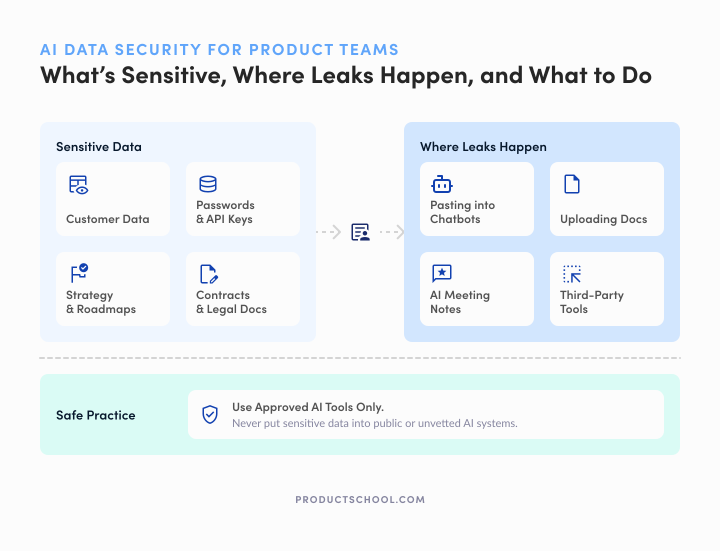
The four data types most at risk in AI reviews are personal/customer data (PII), security credentials and secrets (API keys, tokens, passwords), confidential business/product strategy data (roadmaps, pricing, competitive insights), and legal or regulated documents (contracts, DPAs, regulatory correspondence).
Authoritative guidance like OWASP’s LLM risk work and NIST’s GenAI security profile consistently flags these as the highest-impact categories if exposed through prompts, outputs, logs, or retrieval.
If you protect these four well, you cover the majority of real-world “blast radius” scenarios product teams run into when adopting AI tools.
Common AI-Related Security Vulnerabilities in Product Management
When integrating AI into product workflows, certain vulnerabilities tend to crop up. These aren’t hypothetical. Knowing where the weak points are will help you address them before they cause trouble.
Here are some common ways AI usage can introduce security risks:
1. Accidental data leaks through AI prompts
One of the biggest new risks with generative AI tools (like chatbots or code assistants) is accidental data leakage. This happens when team members input sensitive data into an AI prompt without fully realizing where that data might end up.
For example, a product manager might paste a customer issue log into a chatbot to get help summarizing it, not realizing the chatbot could be storing that log on external servers. Many AI tools store user inputs to retrain models or improve the service. If those inputs contain confidential data, it may be retained on the AI provider’s servers and potentially become accessible to others. In worst cases, that data can surface in other users’ AI results or be compromised in a breach.
A classic example is the incident at Samsung. Employees used ChatGPT to debug code and transcribe meeting notes, inadvertently uploading confidential information to an external system. This raised alarms because ChatGPT’s public interface uses inputs to train the model, meaning sensitive Samsung data could theoretically leak out in future AI responses.
Samsung quickly imposed limits on prompt sizes and started developing usage guidelines to prevent further leaks. They’re not alone – many organizations have grown concerned that employees might share company secrets with AI.
Cyberhaven’s analysis found that about 4.7% of employees had pasted confidential company data into ChatGPT in its first few months of popularity. This is often well-intentioned (people just trying to get help from AI), but it can lead to proprietary information “escaping” the company.
The good news is that there are ways to use AI without this risk. For instance, OpenAI provides an API for ChatGPT where companies can opt out of data being used for training.
2. Using unvetted third-party AI tools
Another vulnerability arises when product teams adopt AI services or integrations without vetting their security. The convenience of a new AI SaaS tool or plugin is tempting, but if it’s not officially approved or assessed by your IT/security group, it can be a blind spot.
This phenomenon is akin to “shadow IT,” and now we have “shadow AI”. It’s where AI tools are used without the organization’s knowledge or control.
If a product team member signs up for a free AI app to analyze user data, that app might be collecting and storing all the input. Many AI startups don’t yet have mature security practices, meaning things like encryption, RAG ruleset, access control, and data retention policies might be weak.
Unsecured AI APIs or integrations can also expose data. If an AI service provides a backend API and it’s not properly secured, attackers could exploit it to retrieve data or inject malicious inputs. Additionally, third-party AI vendors might inadvertently expose data through breaches. As AI tools become common, we’ve seen breaches where chatbot logs or AI-transcribed documents were exposed because the vendor didn’t secure them.
The risk is amplified by how easily employees can adopt these tools. According to Gartner’s research, 84% of SaaS apps (which would include AI tools) are purchased or used outside of IT’s purview.
3. Lack of control and AI governance for product teams (shadow AI)
Expanding on the above, the lack of oversight (or shadow AI usage) is itself a vulnerability. When individuals or product teams use AI tools without informing management or IT, the organization may have no visibility into what data is leaving the company.
This bypasses governance and can lead to inconsistent security measures. For example, an employee might use a personal AI assistant to categorize user feedback, not realizing they just uploaded thousands of customer comments (some with emails or phone numbers) to an external cloud. If no one is monitoring this, the company might only find out about the exposure after damage is done.
Insider threats also play into this. While most employees are well-meaning, someone might intentionally exfiltrate data through an AI service, knowing that it’s not monitored.
Central oversight and eliminating shadow AI can reduce these risks. In practice, eliminating shadow AI means making it easy for teams to use approved AI tools (so they’re not tempted to go rogue) and establishing clear policies that “rogue” usage is not allowed.
4. Model behavior and prompt vulnerabilities
Lastly, when product teams actually build AI-powered features into their products, there are security considerations around model behavior.
AI models (like large language models powering chatbots or agents) can be unpredictable or manipulated. A user might find a way to get your AI feature to reveal information it shouldn’t. This is known as a prompt injection attack.
For instance, if your product’s AI assistant has access to internal knowledge bases or user data, it can be tricked into revealing confidential info or performing unintended actions. Ensuring the model only does what it’s supposed to (through prompt filtering, user authentication, and usage limits) is key to preventing such exploits.
Moreover, AI models can hallucinate (generate false information) or produce biased or unsafe outputs. If not caught, these outputs could present security issues or issues with AI ethics. Imagine an AI feature giving erroneous financial advice based on a hallucination. That’s a risk to both users and the company's credibility.
While this is more of a reliability issue than a direct breach, it intersects with security when a model’s unpredictability could expose sensitive data or violate compliance (e.g., an AI inadvertently generating a snippet of real customer data it somehow absorbed).
Best AI Security Practices for Product Teams
Fortunately, there are concrete steps product teams can take to use AI tools responsibly and securely. You don’t need to halt product experimentation or innovation; you just need to add some smart safeguards and governance to your product management workflows.
Below are practical measures to protect data without slowing down your projects:
1. Set clear AI usage policies and train your team
Start with organizational guidelines. Every team member should know what is and isn’t okay when using AI tools with company data. For example, a policy might state that “no confidential code or user PII shall be entered into any AI system without approval”.
Many companies are creating these guardrails now. Nearly half of HR leaders say they’re formulating guidance on employee use of tools like ChatGPT. Product leaders should work with security, IT, and HR to publish a straightforward policy for AI usage.
Policy alone isn’t enough; you also need to train the team on these best practices, especially for AI prototyping and using multi-agent systems.
Make sure AI product managers, engineers, designers (anyone using AI) understand the risks of copying internal data into public tools. Provide examples (like the Samsung incident) to illustrate why the rules exist.
Training should also cover how to use approved tools properly (e.g., how to anonymize a dataset before analysis, or how to check if an AI vendor will keep your data private). When people understand both the “why” and “how” of AI security, they’re far less likely to make a risky mistake.
2. Classify data and limit what goes to AI
Not all data is equal. A core part of a decision-making framework for AI use is classifying data by sensitivity.
Product teams, in conjunction with data privacy experts, should define categories such as Public, Internal, Confidential, Highly Sensitive, etc. Once you have this, set rules for each category’s exposure to AI:
Public or low-sensitivity data: It might be fine to use external AI services with these, since even if it leaked, it wouldn’t cause harm. (E.g., using ChatGPT to brainstorm generic marketing copy might be acceptable.)
Confidential or high-sensitivity data: This should either never be sent to third-party AI or only be used in very controlled conditions (such as in-house AI systems that keep data on company servers). For instance, raw customer addresses or an unreleased product spec should probably stay out of any external AI prompt.
By enforcing data classification rules, you prevent accidental mishandling. Some companies implement this by masking or anonymizing data before it goes into an AI. For example, if you want an AI to analyze user feedback, strip out usernames or emails first, so the AI never sees real personal identifiers.
Similarly, you can use sample data when possible in early stages. The principle is to share the minimum data necessary for the AI task. The less sensitive data exposed, the lower the risk of a serious leak.
3. Choose secure AI tools and demand vendor transparency
When selecting AI tools or platforms to incorporate into your product or workflow, try to do your due diligence. Treat AI vendors like any other software vendor that might handle sensitive data:
Assess their security measures: Do they encrypt data in transit and at rest? Do they have access controls? What is their track record on breaches?
Check their data usage policy: Reputable AI services should clearly state if they retain your inputs and for what purpose. For example, OpenAI’s enterprise API won’t use your data for training by default – that’s the kind of assurance you want. If a vendor is vague about data handling or refuses to commit to not storing your data long-term, that’s a red flag.
Compliance and certifications: If you deal with regulated data (health info, finance), ensure the AI tool meets relevant standards (HIPAA, SOC 2, GDPR compliance, etc.).
It’s wise to whitelist approved AI tools and block others in your company network. Some organizations maintain an approved list of AI services that have passed a security review. Product teams should stick to that list.
If you find a new tool you really want to use, channel it through a vendor evaluation process rather than going rogue. This might feel slower, but it protects you.
Remember that 84% of SaaS apps used outside IT oversight can open up huge risks, according to Gartner. So involve your security colleagues early. Also, demand transparency from AI vendors.
You have every right to ask how an AI model was trained, how it handles your data, and whether it provides features like data deletion or on-premise deployment if needed. Vendors that are “secure by design” will usually be eager to share these details.
4. Embed security and privacy into AI development
If your product team is building AI features or integrations, treat security and privacy as core requirements from day one. This is often called “security by design” or “privacy by design.”
Concretely, this means:
Limit data collection: Don’t collect more data for your AI feature than you absolutely need. And inform users what you’re collecting (transparency builds trust).
Use privacy safeguards: For example, enforce opt-in for any feature that uses user data in AI, and give users control over their data. Embed anonymization techniques if applicable. If your AI processes user-generated content, consider filtering or moderating outputs to avoid exposing anything sensitive.
Protect data in transit and storage: Any data sent to an AI model (especially if it goes to a cloud service) should be encrypted. Likewise, store any AI-related datasets securely with access controls. Basic cyber hygiene goes a long way. Many AI breaches happen because an endpoint (like an API key or a storage bucket) wasn’t secured.
Validate and test the model’s behavior: Because AI models are unpredictable, test them for edge cases. For example, check that your AI doesn’t inadvertently return parts of its training data (which could include someone else’s inputs) and that it handles prompts safely. If you find the model can be tricked into something undesirable, put guardrails in place.
A security-focused development approach also means being ready to respond if something goes wrong. Have a plan for how to shut off or roll back an AI feature if a vulnerability is discovered (more on that next).
By baking security considerations into product design and product development, you avoid the pitfall of “bolting on” security at the end. This proactive stance saves time in the long run and prevents painful incidents.
5. Start small, feature-flag, and be ready to roll back
One practical way to innovate safely is to use feature flags and phased rollouts for AI-driven features. Rather than launching an AI feature to all users on day one, “pretotype” by releasing it to a small cohort or beta testers.
Monitor how it performs, watch for any odd or risky behavior, and gather feedback. This controlled rollout lets you catch issues early. If something looks amiss (say the AI starts giving strange outputs), you can pause or roll back the feature before it affects everyone.
Aparna Singhar, an expert in AI product strategy, emphasized this point during a ProductCon panel discussion: “You need to be able to feature-flag features to certain users and instantly roll back when things don't work. That can often be the difference between a product that stays at the forefront and one that falls behind. Oftentimes, it's actually security that holds AI back... So to move fast and make sure applications are secure by default.”
In other words, agility and security must go hand in hand. By planning for quick rollbacks and building in security from the start, you won’t be stuck in a situation where you delay a launch due to last-minute security fears.
Feature flagging is a safety net. It allows product teams to move fast without reckless risk. If your AI update has a bug or a vulnerability, you flip a switch and turn it off. This practice, combined with continuous testing and monitoring, means you can iterate on AI features rapidly while still protecting users and data.
6. Monitor AI usage and continually improve safeguards
Lastly, treat AI security as an ongoing commitment. Monitor how AI is being used in your product and within your team. This could involve:
Logging and auditing: Keep logs of what data is sent to AI systems and when. If using third-party APIs, enable logging of API calls (without logging the sensitive content itself, if possible). Regular audits can reveal if someone is misusing the AI or if the AI is pulling in data it shouldn’t.
Anomaly detection: Consider tools or scripts that watch for unusual patterns, like large amounts of data being fed into an external AI at odd hours, or an AI feature suddenly returning error rates or weird outputs. An anomaly might indicate a security issue (for example, an attacker trying to scrape data through your AI).
Feedback channels: Encourage users and team members to report odd AI behavior or potential security concerns. Sometimes the people using the tool will spot issues first, like an AI answer that included a snippet of someone else’s data. That’s gold information to act on.
Regular policy reviews: As AI technology and threats evolve, revisit your policies and safeguards. What worked a year ago might need updating. Perhaps new regulations come out, or you discover a new category of risk (like a new kind of prompt attack). Adaptation is key.
The iterative approach is important because security is not a one-and-done checkbox. It’s a continuous process of improvement. By monitoring and learning, product teams can tighten their AI security over time without stifling the benefits.
Using AI Safely in Product Management Is About Balancing Innovation and Security
Security and innovation are not opposing forces, especially in the age of AI. In fact, they enable each other. A secure environment gives product teams the confidence to try bold things with AI, because they know they have safety nets.
Conversely, trying to innovate without security can backfire spectacularly. One big data leak can derail an AI initiative and erode stakeholder trust, slowing down innovation to a halt.
Before you roll AI deeper into product workflows, make sure the fundamentals are covered:
The data you’re feeding the tool is appropriate. Customer data, credentials, roadmaps, and legal docs don’t belong in “whatever AI is easiest” unless it’s explicitly approved and protected.
The vendor relationship is clear, not assumed. You should know what gets stored, what gets used for training, what can be deleted, and who can access what.
The workflow has guardrails, not just good intentions. Redaction, access controls, and “approved tools only” policies exist because people will move fast under pressure.
There’s a rollback plan before there’s a rollout. If the AI feature or tool starts behaving oddly, you need feature flags, monitoring, and an instant off switch.
Trust is treated as a product requirement. As Jeetu Patel put it, if people don’t trust an AI system, they won’t use it and security becomes a prerequisite, not a tax.
If you do this well, you protect momentum. You stop turning every AI decision into a debate, stop shipping with hidden risk, and stop learning about security gaps from incidents.
Partner with Experienced Transformation Leaders
Ready to approach digital transformation the right way? Product School takes companies from where they are to where they want to be.
Learn more
Updated: April 27, 2026