The Anthropic ecosystem for AI product managers is a connected stack of AI tools that includes Claude Code, MCP, Claude Skills, sub-agents, the Anthropic API, Claude in Chrome, and Claude in Excel. Its real value comes from how these tools work together, not from what any single tool can do alone.
Claude Code is where many PMs start, for good reason. It is the most visible part of the stack because it produces the most tangible output: AI prototypes, specs, code changes, analysis, tests, and working artifacts.
But stopping at Claude Code is a little like buying a Leatherman and only using the knife. Useful, yes. But also a waste of the system.
If you haven’t read our case for why Claude Code matters for PMs, start with our guide. This piece is for PMs who are already familiar with Claude Code and acts as a map of how Claude Code, MCP, Skills, sub-agents, and more combine into PM workflows that no single tool produces on its own.
Because the PMs who get the biggest advantage from Anthropic will be the ones who know how to orchestrate the stack.
Key Takeaways
The compounding value of Anthropic’s tools for PMs lives in the connections between Claude Code, MCP, Skills, sub-agents, the API, Chrome, and Excel.
Claude Code is the most visible entry point into the Anthropic stack, but it becomes more powerful when connected to live PM tools, reusable instructions, and specialized AI agents.
MCP turns Claude from a standalone assistant into part of the PM workflow by connecting it to tools like Linear, Jira, GitHub, Notion, Figma, Slack, and analytics platforms.
Claude Skills give PMs reusable operating playbooks for recurring work like PRDs, competitive analysis, release notes, research synthesis, and stakeholder updates.
The PM advantage is shifting from knowing how to prompt one AI tool to knowing how to design workflows across multiple AI capabilities.
The Map: What’s Actually in the Anthropic Stack
The easiest mistake is to think of Anthropic as “Claude plus Claude Code.” That is true in the same way a product organization is “an AI plus engineers.” Technically correct. Strategically and rationally incomplete.
A better way to understand the Anthropic stack is by where each tool sits in the PM workflow. Some tools help you direct work. Some connect Claude to the systems where work already lives.
PM work rarely happens in one place. A single decision might touch a Jira ticket, a Figma file, and a stakeholder update. The stack becomes valuable when Claude can move across that environment with the right context, instructions, and permissions.
Here is the practical map.
Tool | What it does | Who it’s for | Where it fits in a PM workflow |
Claude Code | Claude Code is Anthropic’s agentic coding tool that can read files, write code, run commands, and operate inside a real project environment. | PMs who want to move closer to prototypes, specs, implementation details, technical tradeoffs, and product artifacts. | It sits closest to building, debugging, prototyping, codebase exploration, and turning product intent into working output. |
Anthropic API | The Anthropic API lets teams build Claude-powered experiences, internal tools, eval pipelines, and product features outside the Claude app. | PMs working with engineering on AI features, internal AI tools, model selection, or evaluation criteria. | It appears when AI becomes part of the product itself, not just part of the PM’s personal workflow. |
Claude Skills | Claude Skills are reusable instruction bundles that Claude can load when a task requires a specific workflow, format, standard, or reference set. | PMs and product teams that repeat the same work often enough to turn it into a playbook. | They fit recurring workflows like PRDs, release notes, competitive analysis, customer synthesis, and stakeholder updates. |
Model Context Protocol (MCP) | MCP is an open protocol that lets Claude and other AI tools connect to external systems through standardized adapters called MCP servers. | PMs whose work depends on live data from tools like Linear, Jira, GitHub, Notion, Figma, Slack, PostHog, Amplitude, or Google Drive. | It turns Claude from a standalone assistant into a workflow participant that can see and act on the systems PMs already use. |
MCP servers | MCP servers expose specific tools, data sources, and actions to Claude through the Model Context Protocol. | Teams that want Claude to interact with product systems in a controlled and reusable way. | They sit between Claude and the PM stack, making live product context available without manual copy-paste. |
Claude in Chrome | Claude in Chrome brings Claude into the browser so it can read pages, navigate websites, and help with web-based workflows. | PMs doing market research, competitive monitoring, vendor analysis, user research, and repetitive web workflows. | It fits the research layer of PM work, especially when useful context lives across web pages and SaaS tools. |
Claude in Excel | Claude in Excel embeds Claude inside spreadsheets so users can ask questions, inspect formulas, update assumptions, and work across complex workbooks. | PMs working on pricing, usage analysis, forecasting, business cases, growth models, or spreadsheet-heavy planning. | It fits the analytical layer of PM work, where product decisions depend on models, scenarios, and tabular data. |
Claude apps | Claude apps give PMs everyday access to Claude across chat, documents, files, and general knowledge work. | PMs who need a flexible workspace for thinking, drafting, synthesis, and analysis. | They act as the general-purpose surface for product thinking before the work moves into more specialized tools. |
Sub-agents | Sub-agents are specialized Claude instances that Claude Code can delegate to for task-specific work with separate instructions and context windows. | PMs handling research-heavy, parallelizable, or multi-part workflows. | They fit orchestration work such as competitive teardowns, interview synthesis, backlog audits, and multi-area product analysis. |
The key is not to memorize the tools. It is to see the layers.
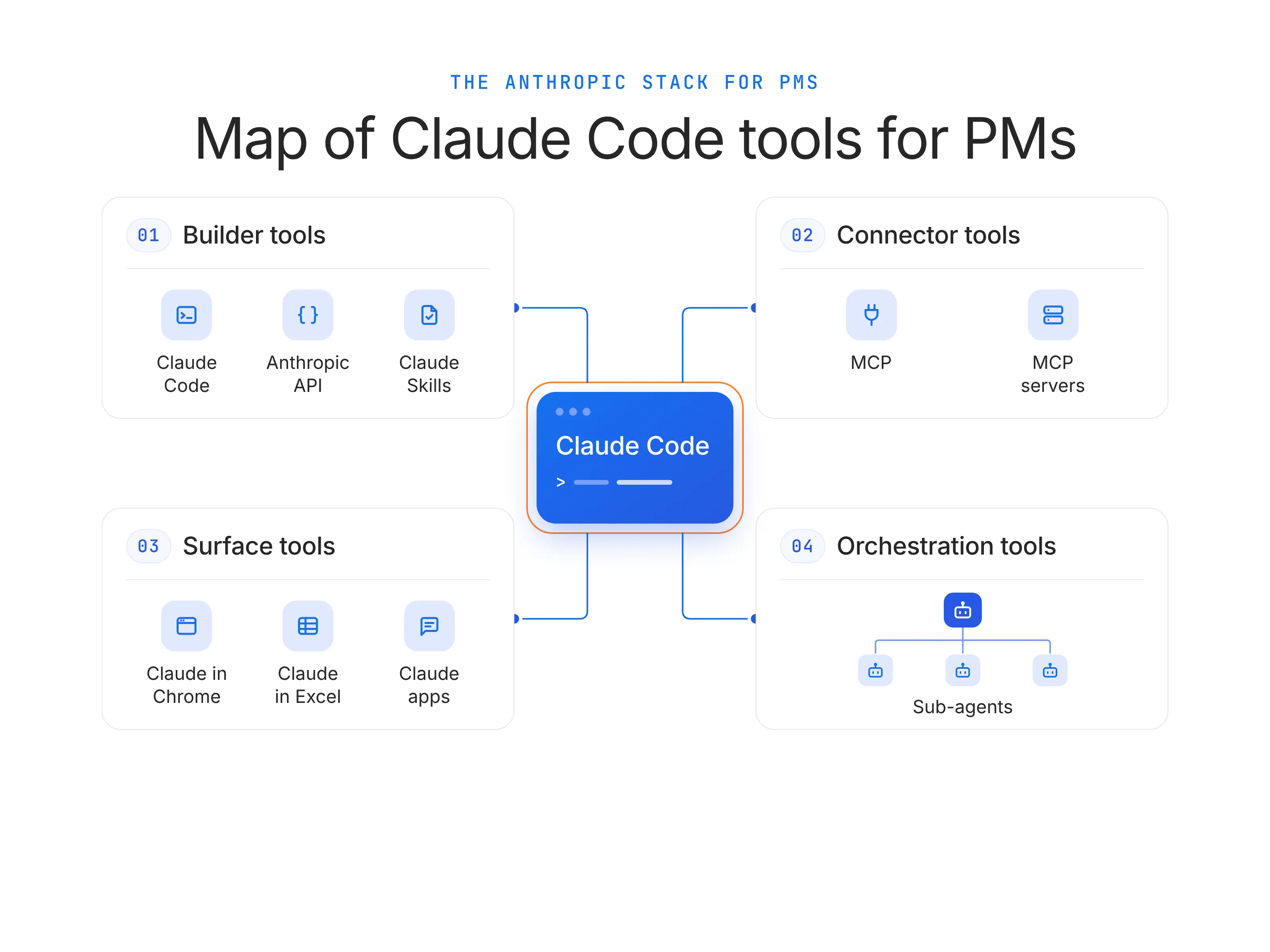
Builder tools are where you direct the work: Claude Code, the Anthropic API, and Claude Skills.
Connector tools are where the work meets your existing systems: Model Context Protocol (MCP) and MCP servers.
Surface tools are where Claude shows up alongside other software: Claude in Chrome, Claude in Excel, and Claude apps.
Orchestration tools are where one Claude directs other specialized Claude instances: sub-agents.
Once you see the stack this way, the strategic question is about which layer of the PM workflow is currently the weakest?
If the problem is blank-page repetition, start with Skills. If the problem is copy-pasting context from product systems, look at MCP. If the problem is research spread across multiple sources, consider Chrome or sub-agents. If the problem is building or evaluating AI inside the product, the API enters the conversation.
Claude Code’s Place in the Stack (and Why It Isn’t the Whole Stack)
Claude Code is Anthropic’s agentic coding tool. It reads files, writes code, runs commands, and operates inside a real project environment.
For many PMs, it is the first Anthropic tool that makes the future feel tangible, because it turns product thinking into something you can inspect: a prototype, a test, a spec, a pull request, a working artifact.
That is why we made the case for why Claude Code matters for product managers first. But I would not mistake the most visible tool for the whole system.
Anuj, Director of Product at Merge, captured the deeper issue well on the Product School Webinar: “Your agent is only as good as the data it has access to. An agent without data access is basically just expensive autocomplete.” That is exactly the shift PMs need to internalize.
In fact, Gartner’s 2025 research makes the same point at enterprise scale: 63% of organizations either do not have or are unsure whether they have the right data management practices for AI.
Gartner predicts that through 2026, organizations will abandon 60% of AI projects that are not supported by AI-ready data. In other words, this puts even bigger emphasis on the question of “what trusted context can Claude Code actually work with?”
Claude Code is the workshop, not the supply chain.
It can build the cabinet, but its real leverage comes when it knows the room dimensions from Figma, the customer complaints from Zendesk, the roadmap constraints from Jira, the metrics from Amplitude, etc.
MCP — The Connector That Turns Claude Into Part of Your Workflow
Model Context Protocol (MCP) is an open standard from Anthropic that lets Claude and other AI tools connect to external systems through standardized adapters called MCP servers.
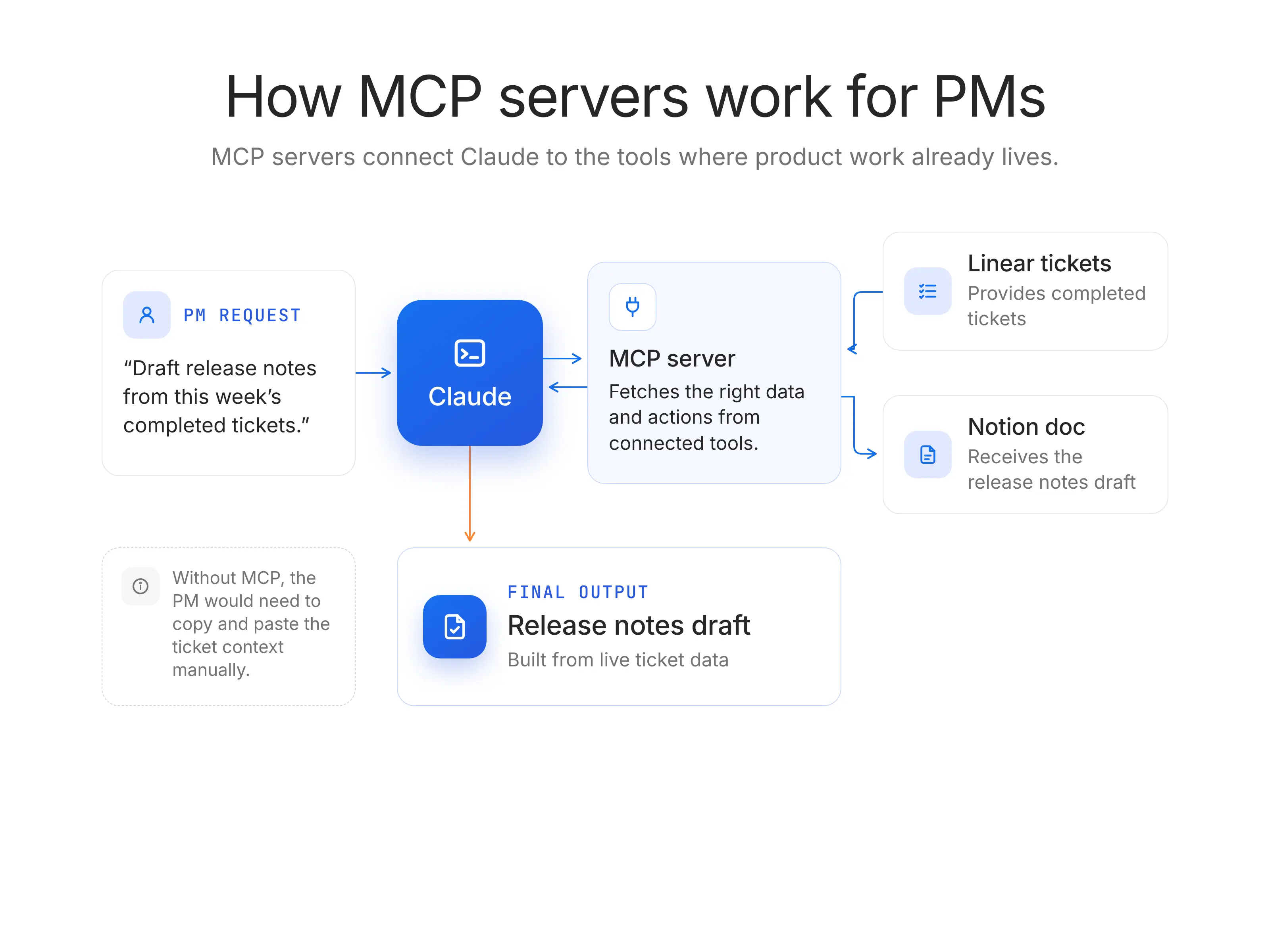
From a PM’s point of view, MCP solves one of the most frustrating problems in AI work: the model is smart, but blind. It can reason well and generate useful outputs. But unless it can see your Linear tickets, Jira backlog, Notion docs, or Google Drive folders, it is still working from whatever context you manually paste into the chat.
Anthropic describes MCP as a standard way for AI applications to receive context from external sources. They say it’s the “USB-C port for AI applications.” In Claude Code, MCP servers can give Claude access to external tools, databases, and APIs, including issue trackers, monitoring systems, design tools, and workflow apps.
Here is a simple version of what MCP unlocks:
Claude Code connects to Linear through an MCP server.
Claude pulls the open or completed tickets from the latest sprint.
The PM asks Claude to identify user-facing changes, skipped internal tasks, and risky ambiguity.
Claude drafts release notes from the actual ticket content.
Claude pushes the draft into Notion, where product marketing or customer success can review it.
Without MCP, the PM copies tickets from Linear, pastes them into Claude, cleans the context, asks for a draft, copies the answer, opens Notion, formats the page, and then repeats the loop when a ticket changes. With MCP, Claude becomes part of the workflow.
MCP servers most relevant to PM workflows
Linear: Connect Linear when you want Claude to inspect issues, summarize sprint scope, draft release notes, or turn ticket context into product artifacts.
Jira: Connect Jira when your roadmap, backlog, engineering delivery, and stakeholder commitments live inside Atlassian workflows.
GitHub: Connect GitHub when PM work depends on pull requests, issue history, implementation details, release branches, or technical discovery.
Notion: Connect Notion when product decisions, PRDs, research notes, meeting docs, and launch plans live in your team’s knowledge base.
Figma: Connect Figma when Claude needs to understand design states, flows, comments, or visual product changes before producing specs or feedback.
Slack: Connect Slack when important product context is buried in decisions, escalations, customer notes, or alignment threads.
PostHog or Amplitude: Connect product analytics when Claude needs to reason from behavioral data instead of assumptions.
Google Drive: Connect Google Drive when PM work depends on research docs, strategy decks, interview transcripts, spreadsheets, or shared planning files.
Filesystem: Connect the local filesystem when Claude Code needs to inspect project files, docs, scripts, datasets, or repo-adjacent artifacts.
The point is not that every PM should connect everything. The practical move is to connect the one system that removes the most manual hand-off.
For many AI PMs, that first server is Linear or Jira. For a growth PM, it might be PostHog or Amplitude. For a product marketing manager, it might be Notion and Google Drive. For a technical PM, it might be GitHub.
This is how I like to think about it. If there’s a context I keep reexplaining to Claude, I should probably be solving it through an MCP server.
What PMs should know before using MCP connectors
Some MCP connectors are reviewed, but not all MCP servers are “official.” Anthropic’s Connectors Directory is intended to showcase reviewed MCP servers that work across Claude products, but teams can also build and connect their own custom MCP servers. Directory presence means the connector has gone through Anthropic’s review process.
Third-party MCP servers should not be treated like harmless prompts. Anthropic’s Claude Code docs explicitly warn that third-party MCP servers should be used only when you trust them, because they can introduce security and prompt-injection risks.
Directory connectors and custom connectors serve different jobs. Directory connectors are reviewed and discoverable inside Claude products, while custom connectors are better for proprietary internal systems, tenant-specific enterprise setups, or elevated permissions that should not be broadly available.
Local and remote MCP setups have different tradeoffs. Local MCP servers can be useful for filesystem access, internal scripts, and desktop workflows, while remote MCP servers are better suited for cloud tools, authenticated SaaS systems, and team-wide workflows. Anthropic supports MCP across Claude Code, Claude.ai, Claude Desktop, Claude Mobile, and the API.
Permissions matter more than novelty. A connector that can read a backlog is different from one that can edit tickets, post to Slack, or create customer-facing docs. PMs should ask what the connector can read, what it can write, who approved it, and whether actions require confirmation.
The best MCP workflows are narrow at first. “Connect Claude to the whole company” sounds powerful, but “let Claude read completed Linear tickets and draft Notion release notes” is safer, easier to evaluate, and easier to operationalize.
MCP is not Claude-only. Anthropic created MCP, but the protocol is open and designed for broader AI-tool interoperability. That matters for product leaders because adopting MCP is not the same as locking every workflow into one vendor.
MCP is becoming infrastructure, not just a Claude feature.
Reporting around the Linux Foundation’s Agentic AI Foundation noted that Anthropic contributed MCP to help keep it open, neutral, and community-driven, with more than 10,000 MCP servers reportedly running globally.
Whatever you do, please, just don’t treat it as a technical curiosity. The better question is: where does your product workflow break because Claude cannot see the thing you are talking about?
If the answer is “our tickets,” start there.
If the answer is “our customer feedback,” start there.
If the answer is “our analytics,” start there.
MCP is the context layer. And in real product work, context is what makes AI a powerful player on your team.
Claude Skills — Reusable Capabilities, not One-Off Prompts
Claude Skills are structured, reusable instruction bundles that Claude can load automatically when a task requires a specific workflow, format, standard, or reference set. A Skill is stored as a folder and usually includes a SKILL.md file, instructions, examples, scripts, templates, and supporting resources that Claude can use when needed.
Anthropic describes Skills as directories containing instructions, scripts, and resources that Claude dynamically loads for specialized tasks.
The first time you ship a feature, you explain the process to everyone. You tell the designer what the PRD should include, for instance. By the tenth time, that should no longer be a conversation. It should be a runbook.
A Skill can carry the team’s template, standards, examples, tone, edge cases, and preferred workflow into the task. It moves the work closer to product operations. That is why I would treat Skills like internal documentation. The highest-leverage Skills should be versioned, reviewed, and improved over time.
If the PRD template changes, the Skill should change.
If the release-note format gets sharper, the Skill should inherit that learning.
If the company’s positioning shifts, the competitive-analysis Skill should not keep using last quarter’s narrative.
Here’s one other caveat for PMs. A 2026 data-driven analysis of agent skills examined 40,285 publicly listed skills and found a pronounced supply-demand imbalance. Skill content is heavily concentrated in software engineering workflows.
For PMs, that is both the warning and the opening. Software engineers are already much further ahead in turning Claude Skills into reusable working systems. That gap will not stay invisible for long.
In senior PM interviews, the strongest candidates will be able to explain how they turn recurring product work into repeatable workflows, how they encode team standards, and how they use tools like Skills, MCP, and Claude Code to work closer to engineering. For PMs who want to build that fluency, Product School’s AI Product Management Certification is a practical place to start.
Three Claude Skills every PM team should consider
“PRD writer” Skill: A PRD writer Skill loads the team’s PRD template, product principles, voice guidelines, decision criteria, and good-and-bad examples so Claude can draft product specs in the format the organization actually uses.
“Competitive analysis” Skill: A competitive analysis Skill loads the product positioning, named competitors, feature taxonomy, product personas, and comparison framework so Claude can evaluate competitors through the right strategic lens.
“Release notes” Skill: A release notes Skill loads the team’s release-note tone, target audience, product-area language, and archive of published examples so Claude can turn shipped work into customer-facing updates that sound consistent.
The mistake I see teams make with Skills is that they use them to preserve formatting instead of judgment. Formatting is useful, but it is the shallow layer. The deeper value is encoding how the team thinks.
That is the difference between automation and leverage. Automation repeats the steps. Leverage preserves the thinking behind the steps.
What Claude Skills are not
Claude Skills are not fine-tuned models, memory, or autonomous agents. A PM building a Skill is not training Claude or changing the underlying model. They are writing structured instructions and packaging reference material so Claude can apply the right workflow when the task calls for it.
Skills are more practical and more immediate: they tell Claude how to do a repeatable task well.
This also makes Skills one of the most accessible parts of the Anthropic stack for PMs. You can start with the workflow you repeat every week, write down the standard you wish everyone followed, add examples, and turn that into a Skill.
If you have typed the same long prompt three times, you probably do not need a better prompt. You need a Skill.
Sub-Agents: When One Claude Isn’t Enough
Sub-agents are specialized Claude instances in Claude Code that a primary Claude can delegate to for task-specific work. Each sub-agent has its own purpose, instructions, tools, and a separate context window, then returns its findings to the main conversation.
Anthropic describes sub-agents as specialized AI assistants that Claude Code can invoke to handle specific types of tasks with their own context and configuration.
The easiest way to understand sub-agents is to think about the difference between one brilliant generalist and a small research team.
One Claude can do a lot. But product work often breaks down into pieces that should not all live in the same context window.
Competitive analysis across five companies
User-interview synthesis across twenty transcripts
Backlog grooming across three product areas
A launch-readiness audit across product, support, sales, and documentation
Those are not one-thread problems. They are parallel problems.
Without sub-agents, the primary Claude has to absorb everything, keep every detail straight, and avoid blending conclusions across unrelated sources. With sub-agents, the primary Claude can have some breathing room to define the framework, delegate bounded pieces of the work, and synthesize the results.
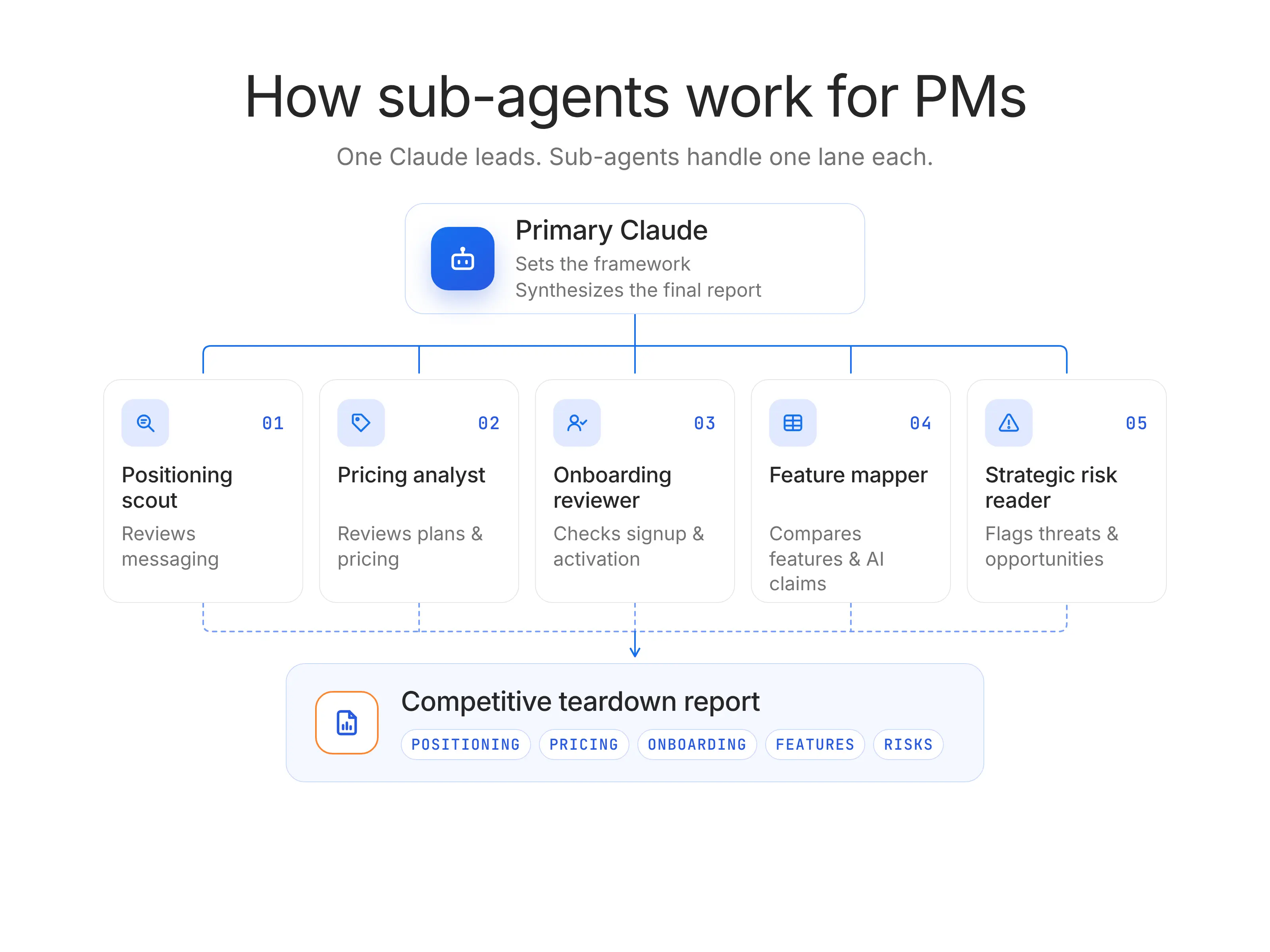
Example: The parallel competitive teardown
Define the teardown framework. The primary Claude creates a consistent comparison structure: target user, core positioning, product pricing, onboarding flow, key features, AI claims, switching friction, and strategic risk.
Assign one competitor per sub-agent. Claude Code delegates the work to five sub-agents, each focused on one competitor and using the same framework.
Keep each investigation clean. Each sub-agent works in its own context window, which reduces the risk of mixing Company A’s pricing model with Company B’s positioning or Company C’s onboarding flow.
Return structured findings. Each sub-agent sends back a filled-in teardown using the same categories, evidence standard, and summary format.
Synthesize the strategic read. The primary Claude compares the outputs, identifies patterns, flags where evidence is weak, and drafts one report for the PM.
The important part is that the work now matches the shape of the problem.
Sub-agents make sense when the work can be split into independent lanes, evaluated against the same standard, and recombined into a useful whole.
This is where I think PMs should be careful. Sub-agents are not a badge of AI native level prowess. They are a coordination pattern. Used well, they create leverage. Used too early, they create parallel chaos.
The PM’s job is to decide the frame before the delegation starts. What question are we answering? What structure should every sub-agent use? What evidence is acceptable? What should come back to the primary Claude? What should be escalated instead of summarized?
That is the hidden skill. Sub-agents reward PMs who can decompose messy product work into clean, bounded investigations.
They also pair naturally with Skills and MCP. A Skill can give every sub-agent the same teardown framework or research rubric. MCP can let them access the right systems. The primary Claude can then act more like an editor-in-chief than a one-person analyst: assigning work, enforcing structure, and producing the final judgment.
Advanced AI Agents Certification
Design and implement adaptive, multi-agent AI systems with memory, collaboration, and risk safeguards. Deploy production-ready AI agents at scale.
Enroll now
What sub-agents are not
Sub-agents are not a separate Anthropic product that PMs buy or deploy on their own. They are a Claude Code pattern for delegation, available through Claude Code’s sub-agent system and related task delegation workflows.
The limits also matter. Sub-agents add cost, latency, and coordination overhead because more model calls and more context gathering are involved. They can definitely add latency because each one starts with a clean slate and may need time to gather the context required for its task.
So PMs should not reach for sub-agents reflexively.
The Anthropic API: When Chat and Claude Code Aren’t Enough
Anthropic API is the programmatic way to build with Claude models inside products, internal tools, evaluation pipelines, and automated workflows.
Anthropic’s API includes a few building blocks PMs should understand at a high level:
Messages API: The standard way an application sends a prompt or conversation to Claude and gets a response back.
Message Batches API: A way to send many Claude requests at once, which is useful for testing prompts, processing large datasets, or running evals across hundreds of examples.
Token Counting API: A way to estimate how much text a request uses before sending it, which helps teams manage cost, context limits, and performance.
Most PMs will never call the API directly. That is fine. A PM does not need to become the person writing the integration. But they do need to recognize when the conversation has moved to a point where your product or team workflow now depends on Claude as infrastructure.
That is where the Anthropic API shows up.
The PM’s job is to scope the AI use case, define the user value, evaluate model fit, and own the AI eval criteria. Engineering owns the implementation. Product owns the question that matters more: what does “good enough to ship” actually mean?
There are three common moments when PMs need to understand the API.
1. PMs encounter the Anthropic API when building an internal AI tool
This might be a backlog triage agent, a customer-feedback clusterer, a support-ticket summarizer, or a research synthesis tool.
The key difference from Claude Code is repeatability. If one PM needs the workflow once, use Claude. If the whole team needs it every week, the API starts to make sense.
2. PMs encounter the Anthropic API when embedding AI into a customer-facing feature
This is where API conversations become product conversations. The PM has to define:
what the feature should do,
what data it can use,
what it should refuse to do,
how errors should appear to users,
and what fallback experience protects trust.
The API is the delivery mechanism. The product decision is whether the AI behavior is useful, safe, reliable, and differentiated enough to belong in the product experience.
3. PMs use the Anthropic API when running evals against prompts, datasets, or model choices
This is where the API becomes more about measuring the system. Teams can test prompts, compare model behavior, run batches of examples, estimate token usage, and evaluate outputs before shipping changes.
Anthropic’s Message Batches API is designed for processing large volumes of message requests asynchronously. This is useful when teams need to run many test cases instead of checking a handful of examples by hand.
This is also where PMs should connect the work to AI evaluations. In AI products, evals are the product quality system. They define which failures matter and whether a model change improves the experience or only looks better in a demo.
Claude in Chrome and Claude in Excel
Claude in Chrome is Anthropic’s browser extension that lets Claude read, click, and navigate websites from a side panel while you browse. Anthropic currently describes it as a limited-access research preview, which matters because browser control is powerful but risky: Claude can interact with websites directly, so permissions, judgment, and confirmation flows should be handled with caution.
For PMs, I would treat Claude in Chrome as a research surface first, not an automation surface.
I would not treat these as the center of the Anthropic stack. They are not as foundational as Claude Code, MCP, or Skills. But they reveal something important about where AI tools are going.
The next advantage is less distance between the model and the moment of work.
That distance matters more than people admit. PMs do not make decisions in clean AI workspaces. They make them with fifteen tabs open and a stakeholder asking for a point of view by 3 p.m. In that environment, even a small amount of friction changes behavior.
If using Claude requires stopping and reconstructing what you were looking at, many PMs simply will not use it at the moment it could help most. Surface tools reduce that friction.
Claude in Chrome is useful when the work lives across the web:
Comparing how competitors explain the same feature
Reviewing pricing pages, changelogs, help docs, and positioning pages
Turning messy market research into a structured teardown
Checking whether a vendor, integration, or partner actually fits the product need
Claude in Excel is useful when the work lives inside the model:
Pressure-testing a pricing assumption
Finding the formula that drives a forecast
Explaining why one cohort behaves differently from another
Turning a raw export into a decision-ready view
The strategic point is not that PMs suddenly need to become power users of Claude in Chrome or Claude in Excel. The point is that AI adoption improves when AI shows up inside the tool where the PM is already thinking.
That is a different kind of product lesson.
There is a limit, though. Surface tools should not become an excuse to automate judgment. Browsing a competitor’s site does not mean Claude understands the market.
This is why I see Chrome and Excel as adoption opportunities, not training priorities. They make Claude easier to use in the flow of work. They do not replace the deeper operating system: Skills for standards, MCP for live context, sub-agents for parallel work, and the API for product infrastructure.
How the Stack Compounds: Three Orchestration Patterns
So far, we’ve treated the Anthropic stack as a set of separate tools. That’s useful for orientation, but it’s not how PM work actually happens.
A PM workflow does not move in neat tool-shaped boxes. It moves from a customer signal to a ticket, from a ticket to a design decision, from a design decision to a launch note, from a launch note to a metric, and then back into the roadmap. The opportunity is to let Claude follow that chain instead of restarting from zero at every step.
The living PRD
PRDs go stale the moment the engineering team starts building. The irony is that the PRD is supposed to create alignment, but as soon as the work moves into tickets, the source of truth starts to split.
By the time someone updates the document, the team has often moved past it.
Workflow:
A PRD writer Skill loads the team’s PRD template, product principles, evidence standards, voice, and examples of strong specs.
MCP connects Claude Code to Linear or Jira, so Claude can see the current ticket structure, implementation notes, unresolved questions, and delivery status.
MCP also connects Claude to the relevant Figma file, so Claude can reference design states, comments, flows, and changes that may not be reflected in the written doc.
Claude Code drafts or updates the PRD from the live product context, not from a blank page.
The PM asks Claude to update only the sections that changed: scope, open questions, user flows, risks, rollout notes, or success metrics.
Claude flags mismatches between the PRD, tickets, and design states instead of quietly smoothing them over.
Why it compounds: The Skill gives Claude the team’s standard. MCP gives Claude the current reality. Claude Code gives Claude a working environment where it can inspect, compare, and update artifacts.
No single tool creates a Living PRD.
A Skill alone gives you a better template.
MCP alone gives you access to data.
Claude Code alone gives you execution.
The parallel competitive teardown
Competitive analysis is one of the most abused workflows in product.
It is either too shallow to matter or too heavy to repeat. A PM spends two days reviewing five competitors and three weeks later the market has already moved. The analysis becomes a snapshot pretending to be a map.
Workflow:
A competitive analysis Skill loads the company’s positioning, named competitors, buyer personas, comparison criteria, and “how we win” narrative.
The PM defines the teardown question clearly: pricing risk, onboarding quality, AI positioning, feature parity, enterprise readiness, or switching friction.
Claude in Chrome reviews current public pages, docs, pricing pages, changelogs, help centers, and product messaging.
Alternatively, Claude Code spawns sub-agents, with one sub-agent assigned to each competitor.
Each sub-agent fills in the same teardown framework, using the same evidence standard and summary structure.
The primary Claude synthesizes the findings into one strategic report: what changed, what matters, what is noise, and where the team should respond.
Why it compounds: The Skill prevents generic comparison. Claude in Chrome or sub-agents bring in fresh research. The primary Claude turns parallel findings into one product point of view.
The value is not that the work gets faster, although it does. The value is that the team can afford to make competitive analysis more continuous. That changes the posture.
The self-serve insights loop
Many product teams say they are data-informed, but the workflow tells a different story.
The PM has a question. The analyst has a queue. The answer arrives three days later. The answer creates a better follow-up question. That follow-up waits another three days. By the end of the loop, the PM has lost a week and the decision has either moved on or become political.
The bottleneck is the hand-off.
Workflow:
MCP connects Claude Code to PostHog, Amplitude, or the team’s analytics environment.
A metrics Skill loads the company’s event taxonomy, activation definition, user segments, funnel names, and rules for interpreting product data.
The PM asks a product question in plain English: “Where do new team accounts drop before inviting a second user?”
Claude translates the question into the right query structure, using the team’s actual events and segments.
Claude returns the result with caveats: missing events, weak sample sizes, segment ambiguity, or places where an analyst should review the logic.
The PM iterates immediately: “Now compare this for self-serve accounts versus sales-assisted accounts.”
When the analysis becomes high-stakes, the PM can bring the analyst in with a clearer question and a better starting point.
Why it compounds: MCP provides access to the analytics system. The Skill provides the team-specific metrics language. Claude Code provides the interface for exploration.
Together, they collapse the first layer of the analyst hand-off.
In this workflow, analysts stop spending their time translating basic product curiosity into first-pass queries. PMs get to explore faster. Analysts get pulled into sharper questions.
That is what good orchestration should do. It should protect expert time for the moments where expertise actually matters.
These three patterns point to the same lesson: the Anthropic stack compounds when each tool does a different job.
What a PM Should Learn First (and What to Leave for Later)
The Anthropic stack rewards sequence. Learn it in the wrong order, and you create complexity before you create leverage.
A PM who jumps straight to sub-agents without a clear Skill often gets five agents producing five different versions of mediocre work. A PM who writes a beautiful Skill before connecting Claude to the right system gets polished output based on stale context.
So, to remove the next bottleneck in your workflow, try to go step by step.
Start with Claude Code.
Claude Code is the foundation because it teaches you how to work with Claude inside a real project environment. The Claude Code for PMs piece covers this in depth, so I will not repeat the full case here. The important point is that Claude Code gives PMs the first real feel of agentic work: inspecting, editing, testing, and producing artifacts inside the place where work happens.Add one MCP server.
Pick the connector that removes your biggest hand-off. For most PMs, that will be Linear or Jira because tickets are where product intent becomes delivery reality. Do not start by connecting everything. Start with the one system you keep copy-pasting from.Create one Skill for a recurring workflow.
Choose a workflow you do every week: PRDs, release notes, stakeholder updates, research synthesis, or competitive analysis. The Skill should store the standard: what good looks like, what evidence matters, what language to use, and what Claude should flag instead of glossing over.Use sub-agents only when the work truly parallelizes.
Sub-agents are useful when one task can be split into independent lanes, such as five competitors, twenty interviews, or three backlog areas. They are not useful when the work requires one continuous line of reasoning. Use them after you have at least one or two Skills. Otherwise, you are just multiplying ambiguity.Treat surface tools as adoption opportunities.
Claude in Chrome and Claude in Excel are valuable because they reduce friction. They bring Claude closer to browsing, research, spreadsheets, pricing models, and messy analysis. But they are not the first thing to master. They make good workflows easier to use; they do not create the workflow by themselves.Leave the API for product infrastructure decisions.
Most PMs do not need to call the Anthropic API directly. You need to understand it when you are building an internal AI tool, embedding Claude into a customer-facing product, or owning eval criteria for an AI feature. That is when the work moves from personal productivity to product infrastructure.
If you can’t influence org-level decisions, start smaller. Claude Code, one MCP server, and one personal Skill are enough to upgrade your own workflow without waiting for a platform roadmap.
That is often the right first move anyway. Prove the pattern locally, then make the case for adopting it as a team standard.
Vibe Coding Certification
Go from idea to prototype in minutes. Build, debug, and scale AI prototypes with the latest tools to integrate APIs securely and hand off to engineering fast.
Enroll now
A PM’s Anthropic Stack Diagnostic
Use The Anthropic Stack Leverage Diagnostic to decide where the next layer of the Anthropic stack will actually improve your workflow.
Score each question from 0 to 2.
0 = not a real problem yet
1 = useful, but not urgent
2 = frequent, painful, and worth solving now
The Anthropic Stack Leverage Diagnostic
Question | Score 0 | Score 1 | Score 2 | What to do next |
Which PM hand-off would change the most if Claude could see the data live? | You rarely copy context between tools. | You copy context sometimes, but it does not slow major work. | You constantly move tickets, docs, research, or metrics between systems. | Add one MCP server, usually Linear, Jira, Notion, GitHub, PostHog, Amplitude, or Google Drive. |
Which recurring workflow do you still start from a blank page every week? | Most work is one-off or already well-templated. | You repeat some formats, but quality does not vary much. | PRDs, release notes, research summaries, or stakeholder updates are rebuilt from scratch. | Create one Skill that captures the standard, examples, and decision rules. |
What research task is too wide for one Claude thread? | Most analysis fits in one clean conversation. | Some research has multiple sources, but one thread still works. | You regularly compare competitors, synthesize many interviews, or audit multiple product areas. | Use sub-agents once the framework is clear. |
Which one connector would unlock the most other workflows? | No single system holds critical context. | One tool would help, but the payoff is narrow. | One system clearly sits at the center of product work. | Start with that MCP server before adding anything else. |
If you stopped at Claude Code, what workflow would you never reach? | Claude Code already covers your main needs. | You see extra value, but the workflow is not mature. | You need Claude to combine live context, team standards, and repeated execution. | Move from single-tool usage to an orchestration pattern. |
How to interpret your score
0–3: Stay focused on Claude Code.
You probably do not need more stack complexity yet. Get better at using Claude Code for specs, prototypes, codebase exploration, and product artifacts before adding more tools.4–6: Add one missing layer.
You likely have one obvious bottleneck. If the pain is the live context, add MCP. If the pain is inconsistent, repeated work, build a Skill. Do not add both at once unless the workflow is already clear.7–8: Build your first orchestration pattern.
You are probably ready for something like a Living PRD, Parallel Competitive Teardown, or Self-Serve Insights Loop. The key is to design the workflow before adding more tools.9–10: Treat the stack as product infrastructure.
At this level, the work should move beyond personal productivity. Version Skills, standardize MCP access, define permissions, and turn the best workflows into team-level operating patterns.
If the same hand-off, blank page, research loop, or data request keeps slowing the PM team down, that is where the Anthropic stack should go next.
The PM Advantage Is Orchestration, Not Tool Mastery
The PM advantage in the Anthropic stack is not mastering every tool in isolation. It is seeing where the tools connect.
Claude Code gives PMs a place to work.
MCP brings in live context.
Skills preserve team standards.
Sub-agents split wide problems into focused lanes.
Surface tools bring Claude closer to the browser, spreadsheet, and systems where PM work already happens.
The leverage comes from orchestrating those pieces into workflows that reduce hand-offs, preserve context, and make better product judgment easier to repeat.
PMs who build that habit now will not just keep up with AI tooling. They will compound with it.
To go deeper, explore Product School’s Claude Code course and AI Product Management Certification.
Claude Code for Product Managers
Claude Code is already changing how the best PMs work — at Stripe, Linear, and the fastest-moving teams in tech. Use the AI tool reshaping product work to prototype, analyze, and ship, before a ticket is written.
ENROLL NOW
Updated: November 4, 2026