Claude Code is an agentic coding platform and one of the best AI tools that changes what an AI PM can independently do across the entire product lifecycle (from research synthesis to data analysis to working prototypes) without writing code.
In AI-native companies, PMs are expected to walk into a room having already tested the idea, poked the data, and brought something tangible into the room. And mostly, they are expected to have done it with Claude Code.
This piece is not a setup tutorial. The internet is already full of articles taking that approach. This is the article for PMs and product leadership on why this skill matters now and why learning it properly may separate you from the PMs using hammers to crack nuts.
Key Takeaways
Claude Code gives product managers a way to move from idea to working prototype without waiting for sprint capacity.
The real divide is no longer between technical and non-technical PMs, but between AI-capable PMs and AI-aware PMs.
Claude Code changes PM work across the full lifecycle, including research synthesis, data analysis, prototyping, and workflow automation.
PMs do not need to become engineers to use Claude Code well, but they do need to get comfortable directing software clearly.
The advantage is not just speed. It is better validation, sharper decisions, and more independent product work.
What Claude Code Actually Is (And Why It’s Not What PMs Think)
Claude Code is Anthropic’s AI coding agent that runs in your terminal. It reads and writes files, executes commands, and creates git commits, all from plain English.
A portion of PMs still hear “Claude” and picture another tab next to ChatGPT. Claude Code is not that. It belongs to the world of agentic coding, which means it does the agentic AI work inside a real working environment.
The difference between Claude Code and Claude AI
Claude.ai gives you a response in a window. Claude Code operates directly on your files and codebase.
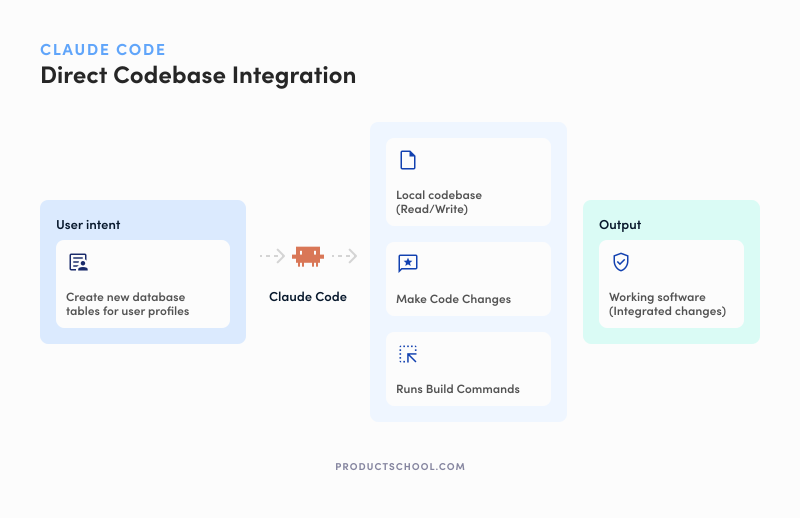
You describe what you want, it reads the relevant files, makes changes, runs commands, and helps produce something usable on the other side. The input is intent. The output is working software.
Comparison Point | Claude Code | Claude.ai |
Core job | Acts on your project directly: reads files, writes code, runs commands, and can create git commits. | Gives you responses, drafts, analysis, and other chat-based outputs inside a conversation. |
Relationship to your codebase | Built to work inside a real codebase and project environment. | Can discuss code and help with files, but it is not primarily a terminal-native codebase workflow tool. |
Can it run commands? | Yes, running commands is part of the product’s core workflow. | Not as its default operating model; it is mainly conversational. |
Can it make git commits? | Yes. Anthropic explicitly documents git commits as part of Claude Code’s workflow. | No clear equivalent as a core chat feature. |
What the output feels like | Working software, file changes, command results, and project updates. | Answers, summaries, drafts, visuals, and app-style outputs inside chat. |
For PMs, that changes the mental model. Most of the content out there was written by engineers. It all starts with repos, terminals, branches, and git workflows. No surprise so many PMs bounce off it.
The vocabulary feels foreign, but the actual AI use cases are not. Turn a brief into a prototype. Analyze a CSV without waiting for an analyst. Those are PM problems, not engineering fantasies.
The PM Role Is Splitting and Claude Code Is the Dividing Line
AI-capable PMs validate. AI-aware PMs still wait. That is the split.
AI PMs use tools like Claude Code to independently prototype, query data, pressure-test assumptions, and walk into the room with something real. The gap between those two groups is about to become a career gap.
I touched on this recently in my ProductCon London talk, and I meant it quite literally: We are living weird times. Product managers think they can code and design. Designers think they can code and build products. Engineers the same. All these roles are converging into what’s being called a builder.
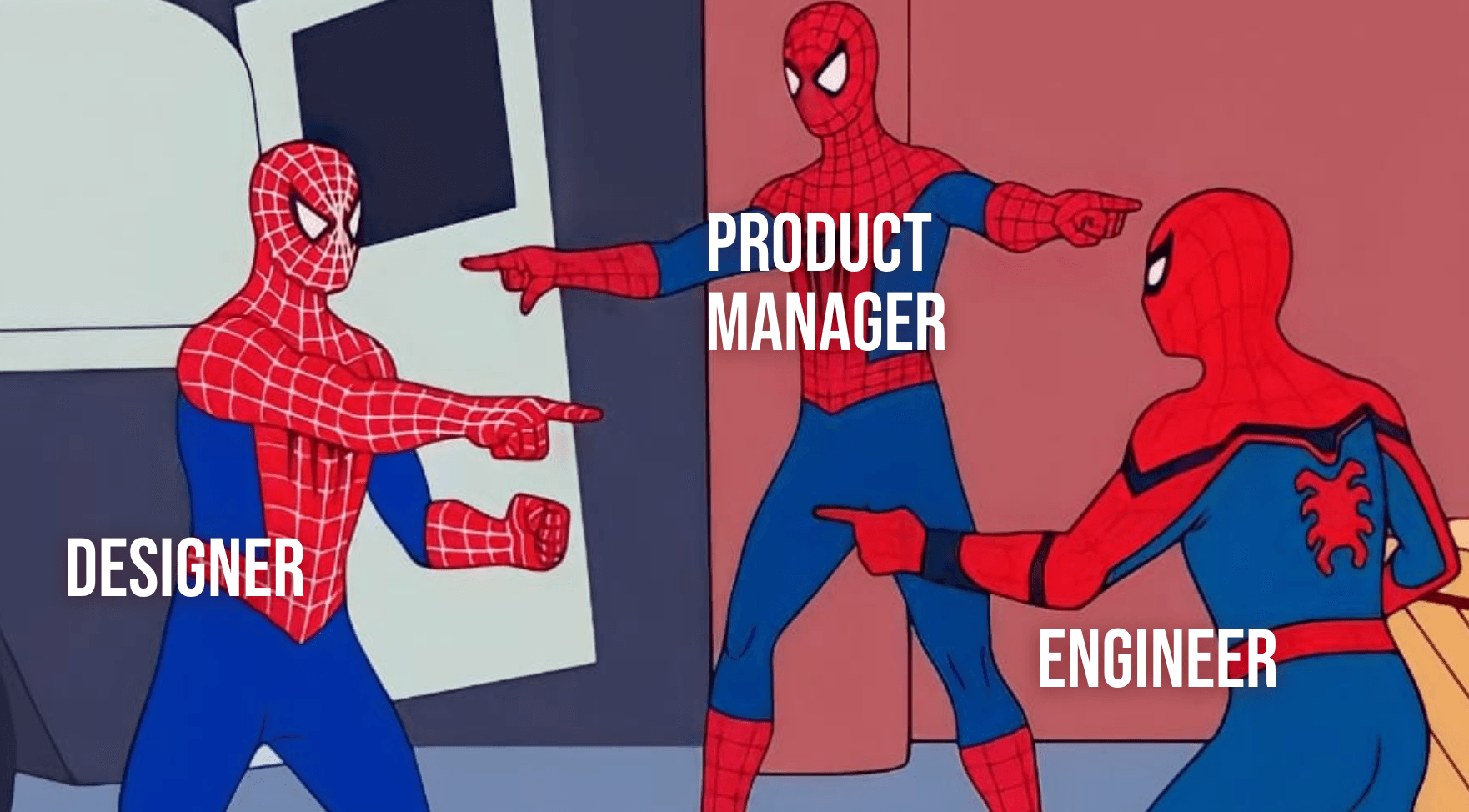
That is exactly what Claude Code accelerates. It turns a PM from someone who frames work for others into someone who can validate the riskiest part of the idea before engineering ever touches it. That’s validation work. You know, the kind that saves weeks.
Before Claude Code: the PM writes the spec, waits for sprint capacity, reviews the mockup, and hopes the team built the right thing.
After Claude Code: the PM goes from user interview insight to working prototype to tested hypothesis in an afternoon.
This matters because teams are getting leaner while the scope keeps expanding.
The old “two-pizza team” logic is already breaking down. In the age of AI, it’s more like one pizza. The teams are much smaller, and the agents don’t eat pizzas. They eat tokens.
The hiring market is already bending in that direction. LinkedIn’s January 2026 labor-market report found that Product Management is one of the top three job functions by share of AI-skilled members, tied with Engineering at 10%.
And job-posting data from Lightcast shows postings requiring AI skills jumped 73% from 2023 to 2024, then another 109% from 2024 to 2025. That means AI fluency is rapidly moving from nice to have to table stakes.
That is why we went above and beyond to create Product School’s Claude Code course. It is taught by an actual AI Product Leader at Intuit, Faran Najam, who uses Claude Code as part of the real PM workflow, not as a party trick.
What PMs Can Actually Do With Claude Code
If you want to understand why Claude Code matters, start with these six shifts. This is where the job itself begins to change.
Turn user research into structured insights in minutes. What used to take half a day of tagging transcripts, copying quotes, and forcing patterns into a doc can now become a structured insight report in minutes.
Go from problem brief to working prototype in hours. Instead of writing a strong brief and waiting for someone else to make it tangible, PMs can now turn a sharp problem statement into a testable prototype without spending engineering time on early validation. That is the shift behind Lesson 3.
Read a codebase without writing code. What once required an engineer to explain what was happening under the hood can now be explored directly, with Claude Code helping PMs trace logic and understand the product more deeply. It’s useful for PMs who want technical fluency without a full engineering detour.
Query product data in plain English. Instead of filing a request, waiting on an analyst, and losing momentum before the follow-up questions even arrive, PMs can ask the question directly and get answers from their actual product data while the context is still fresh.
Build a PRD process that improves itself. Rather than starting every PRD from scratch and hoping the quality holds up on a low-energy day, PMs can build a repeatable documentation workflow that reflects their standards and gets better with use.
Deploy autonomous agents for ongoing product health. Instead of manually checking dashboards and spending time confirming nothing is broken, AI PMs can create agents and vibe code to monitor performance, compare against baselines, and flag anomalies automatically.
This is the real appeal of Claude Code for PMs. And if these six shifts feel more like the new baseline, that is the best argument for learning Claude Code in a structured PM context rather than piecing it together from random tutorials.
Why Not Just Use ChatGPT Codex or Cursor?
Claude Code feels closer to “describe the outcome and let the agent work through the project,” while Cursor still feels editor-first, and Codex increasingly feels like a broad software agent living inside the larger ChatGPT universe.
PMs already use chat-based AI. The real question is what happens when you need the output to leave the chat window and become something real. That is where Claude Code stops looking like “Claude, but for coding” and starts behaving like a different category of AI tool altogether.
Claude Code is Anthropic’s agentic coding system. It reads your codebase, edits files, runs commands, works with git, and can connect to outside tools through MCP. This is why Anthropic explicitly frames it as an entry point to software development for builders without an engineering background.
ChatGPT Codex is OpenAI’s coding agent for software development, now bundled into ChatGPT paid plans, and it has become broader than “just coding.” It can write code, understand codebases, work across multiple terminal tabs, use plugins and MCP servers, browse the web inside the app, generate images, schedule future work, and even operate your computer on supported setups.
That makes it attractive to people who already live inside the ChatGPT ecosystem and don’t want the costly switch. Jeff Smith, CPO at Zoom, put well in The Product Podcast. “If you have years of training in a particular tool, the switching cost is ridiculous.”
There’s also Cursor, an AI code editor and coding agent built around an editor-first workflow. It is powerful, increasingly agentic, and clearly designed for people who already think in terms of files, editors, terminals, PRs, and coding environments. This is exactly why many AI PMs find it impressive but not immediately welcoming.
With that said, the gap is not power. All three tools are powerful. The gap is the mental model.
For a PM trying to learn Agentic AI through product work rather than through developer culture, that difference matters.
Here’s the practical comparison:
Comparison Point | Claude Code | ChatGPT Codex | Cursor |
Core identity | Agentic coding system | Coding agent for software development | AI code editor and coding agent |
Natural home | Terminal, plus IDE, desktop, and browser surfaces | ChatGPT/Codex app workspace with agent features, browser, and desktop actions | Editor-first environment with desktop and CLI workflows |
Best known for | Working directly on a project: files, commands, tests, commits, MCP-connected tools | Broad agentic work across coding, browsing, plugins, images, automations, and computer use | AI-native editing, autocomplete, and agent work inside a coding environment |
Output style | Working code, file changes, command results, commits | Code plus broader agent outputs across apps and tools | Code changes and agent work centered on the editor workflow |
Easiest starting point for PMs | Strong, because Anthropic explicitly positions it for builders beyond engineering | Moderate, especially if you already work in ChatGPT, but the product is broader than a PM-specific coding workflow | Lower, because the editor-first experience assumes more developer comfort |
What it feels like | “Tell it what to build in my project” | “Give one agent many kinds of software work” | “Work inside an AI-native code editor” |
ChatGPT Codex does have real advantages. Pretending otherwise would make the comparison feel flimsy. It is especially attractive if you want a broader agent that can move between coding and general desktop work, or like the idea of long-running automations, browser-native workflows, and lots of integrations in one place.
That said, many PMs still gravitate to Claude Code for very practical reasons:
It is more explicitly repo-first and project-first. You describe the goal, and Claude Code works through files, commands, tests, and commits in the environment where the work actually lives.
Anthropic openly positions it for builders without an engineering background, which is unusually relevant for PMs learning this category for the first time.
MCP support maps cleanly to PM reality: Jira, Slack, Google Drive, and other external tools can be brought into the workflow without turning the experience into a general-purpose AI sprawl.
Its value proposition is narrower and therefore clearer. Claude Code is trying to help you build and operate on real software projects, not become your “everything agent”. That focus can make it easier to learn and easier to trust. This last point is an inference from the official product positioning.
So no, the answer is not “Claude Code is the only serious option.” Codex is broader. Cursor is beloved by many developers for good reason.
But for PMs, the deciding factor is usually not raw horsepower. It is whether the tool helps them learn a new way of working without forcing them to first become pretend engineers.
Do Product Managers Need to Know the Code to Use Claude Code?
No. Product managers do not need to know how to code to use Claude Code well.
What they do need is the ability to describe what they want with precision. That means defining the problem clearly, setting constraints, and stating the desired outcome in a way a system can act on. That is not an engineering skill. That is product management at its best.
Again, Jeff Smith said it perfectly on the Product Podcast: “You need the skills to craft a strategy and to ask the right questions.”
The honest nuance is that Claude Code does not hide the environment from you. You will interact with a terminal. You will see code. You may not need to write it, but you do need to become comfortable around it. That is a different bar than “learn to code,” and it is a much more realistic one.
The most important skill in Claude Code is not coding. It is brief writing.
The sharper the brief, the better the output. AI PMs who can write a strong problem statement, define edge cases, and explain success clearly already have the core muscle this tool rewards.
That is also why so many non-technical PMs can become effective with Claude Code faster than they expect. The tool asks them to simply stop being vague. And for the best PMs, that is the whole job.
Claude Code Readiness Check: Is Claude Code Right for You?
Not every PM needs Claude Code right now. But for a growing number of AI PMs, the question is whether they want to learn it before or after the gap gets wider.
Claude Code is a strong fit if you:
Regularly wait on engineering capacity to validate product ideas.
Spend hours manually synthesizing user research or interview transcripts.
Depend on analysts for product questions you wish you could answer yourself.
Want to walk into sprint planning with something real, not just a spec.
Work on a team that is getting leaner while your scope keeps expanding.
Already write sharp briefs and problem statements.
Want to get closer to the codebase without becoming an engineer.
Care about controlled automation more than shiny demos.
You can wait if you:
Are still building foundational PM skills and need to master the basics first.
Work in a domain where prototyping is not a meaningful part of your workflow.
Already have strong engineering support and no real bottleneck around validation.
The simplest way to think about it is this: Claude Code matters most when you are blocked by dependency. If your biggest product problems still require someone else to make progress for you, this is probably a skill worth learning sooner rather than later.
AI tool fit scorecard for PMs
For each statement below, give yourself 1 point if it feels true and 0 points if it does not.
I mostly use AI to think better, write faster, and summarize information.
I want to validate ideas without waiting for sprint capacity.
I am comfortable seeing code if it helps me make better product decisions.
I prefer tools that feel like a code editor or IDE.
I want AI to work directly on files, repos, and commands.
I mainly want better drafts, better notes, and faster brainstorming.
I like the idea of one tool handling broader agent work across apps and workflows.
I want to turn a sharp brief into a prototype or workflow, not just a document.
I am happy learning through a developer-style environment.
I want a PM-friendly bridge into more technical work.
I care more about orchestrating multiple agent tasks than about staying close to one project workflow.
My biggest frustration is that I can think clearly, but I still depend on too many people to make progress.
How to score it
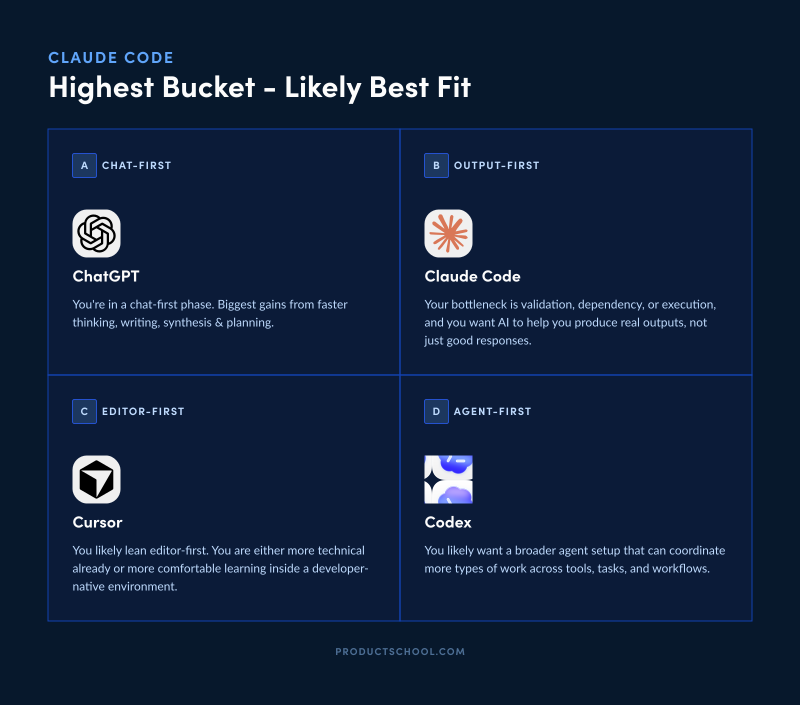
Add up your points in these four buckets:
Bucket A: 1, 6
Bucket B: 2, 3, 5, 8, 10, 12
Bucket C: 4, 9
Bucket D: 7, 11
What your score means
Highest bucket | Likely best fit | What it means |
Bucket A | ChatGPT | You are still in a chat-first phase. Your biggest gains come from faster thinking, writing, synthesis, and planning. |
Bucket B | Claude Code | You are a strong fit for Claude Code Course or you can already try using it. Your bottleneck is validation, dependency, or execution, and you want AI to help you produce real outputs, not just good responses. |
Bucket C | Cursor | You likely lean editor-first. You are either more technical already or more comfortable learning inside a developer-native environment. You could also benefit from exploring our in-depth course on Vibe Coding for PMs. |
Bucket D | Codex | You likely want a broader agent setup that can coordinate more types of work across tools, tasks, and workflows. |
Claude Code Is Becoming a Part of AI Operating Model
The gap between AI-aware PMs and AI-capable PMs is no longer theoretical. One group still uses AI to think faster. The other uses it to validate faster, prototype faster, and walk into product conversations with something real.
Claude Code is one of the clearest applied skills separating those two camps right now.
That is what makes it worth learning well. It’s part of a new PM AI operating model.
If that shift feels relevant to the way you work, Product School’s Claude Code for Product Managers course is the structured place to make it real: live, applied, and built specifically for PMs by an AI Product Leader at Intuit. Product School’s current course page also states it is free for PS Members.
Updated: June 12, 2026