Q: We already use “AI” in our day-to-day work (writing docs, summarizing research, drafting Jira tickets). When does it actually make sense to use an AI agent (for internal product workflows and decision-making), and when is that just hype?
Here’s the opinionated-but-practical answer I’d give if you asked me in a hallway at ProductCon:
Use AI agents when you’re willing to give a piece of work an autonomy budget.
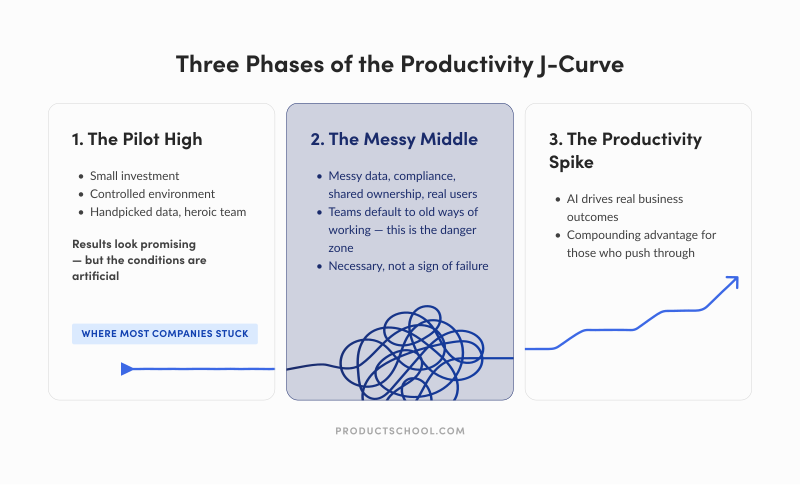
Meaning, you’re okay with the system taking multiple steps you didn’t explicitly script. The upside is speed and coverage, and the downside is occasional weirdness you can catch and correct.
The art is finding the balance between the two. And that’s exactly the purpose of this piece.
Don't Just Jump the AI Agent Bandwagon
Even when agents work, they can still be a bad deal. We’re quick to get sold the idea of creating AI agents, but they are known to be expensive to run, not super easy to govern, brittle to trust, and difficult to measure.
I’m not trying be contrarian, nor am I a late adopter. Gartner predicts over 40% of agentic AI projects will be cancelled by 2027. Asking “when to use AI agents” is key to keeping your agent from getting cancelled.
Moreover, a huge share of enterprise AI still produces individual gains, not business or product OKRs.
The MIT NANDA report argues that 95% of organizations get ZERO RETURN from GenAI initiatives. These general-purpose tools are widely adopted, often mindlessly, without actually moving the needle on ROI.
This is why the AI agent question matters.
I encourage product teams to ask: “When is autonomy worth the cost? And how do you develop judgment for that question inside real product teams?
By the way, this piece is about internal workflows and decision-making, not shipping agents as product features. Our focus actually makes the question more interesting for AI PMs. Internal use is where ROI can be real and where risks are easiest to underestimate.
A CEO's Field Guide to AI Transformation
Research shows most AI transformations fail, but yours doesn’t have to. Learn from Product School’s own journey and apply the takeaways via a powerful framework for scaling AI across teams to boost efficiency, drive adoption, and maximize ROI.
Download Playbook
What People Mean by AI Agents in a Product Team Context
The term “AI agent” is already overloaded. From what I’ve seen working with product teams, some people mean fully autonomous systems, while others mean LLM-driven workflows with guardrails.
For AI-native product teams, the most useful definition is the simplest one:
An agent is a system that independently accomplishes tasks on your behalf by using a model to run the workflow (not just answer questions) and tools to take action, ideally within explicit guardrails or with a human in the loop.
That definition helps you separate three things that often get lumped together:
Assistant (chat/copilot): helps you think, write, brainstorm, and retrieve info. You stay “in the driver’s seat.”
Workflow automation (deterministic): executes predefined steps. Great when requirements are stable, and you need predictability.
Agent (agentic workflow): decides what to do next, calls tools, handles exceptions, loops until done (or escalates). This is what makes it powerful (and risky).
ChatGPT agent mode as a human-supervised agent
I recently wrote the piece about ChatGPT for PMs, so it’s worth pointing this out. ChatGPT’s agent mode fits cleanly into the “agentic workflow” category, but…
It’s a general-purpose, human-supervised agent.
What that means in practice:
What it is: A system that can execute multi-step work across tools, use judgment to decide what to do next, and adapt as it goes.
What keeps it supervised: It should defer to a human when the task is ambiguous, high-impact, or requires explicit approval.
What it is not: It is not a fully autonomous system, nor is it deterministic workflow automation.
A simple way to think about it: It is “autonomous until it shouldn’t be.”
This matters because it can look like automation (especially when you reuse it for the same internal workflow), but it’s not deterministic. Meaning, it does not behave like a fixed workflow that runs the same way every time.
It’s also great for messy work and weaker for “must behave the same every time.” N8n, for reference, you node-by-node execute traces in a workflow system, and support dev/prod environment patterns tied to Git branches and instances.
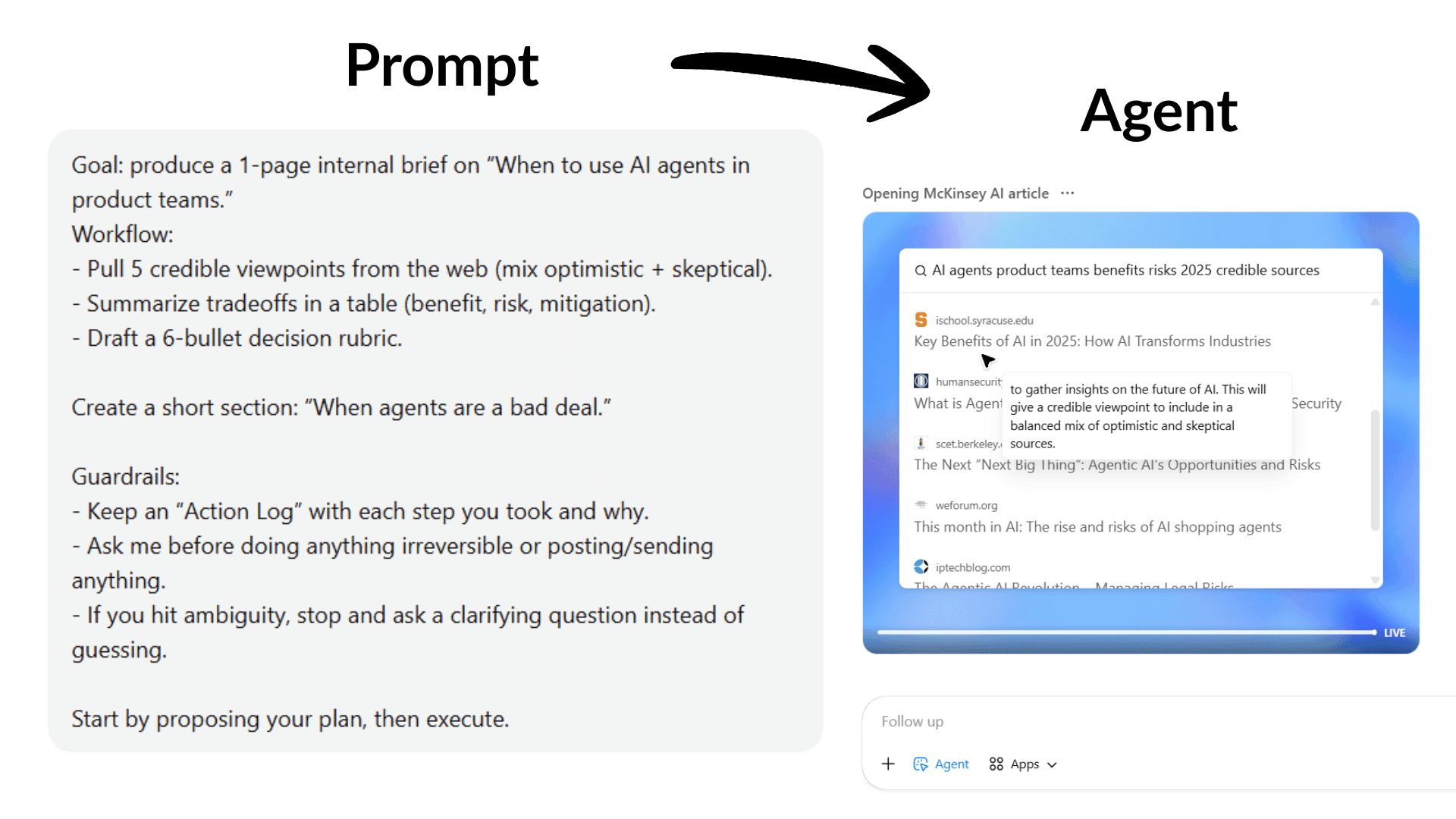
It’s still making decisions step by step. So you get speed and flexibility, but you also inherit the agent tradeoff: governance, observability, and clear “stop and ask” guardrails become part of the product work.
The Core Tradeoff in AI Agents: Three Main Points of View
I expect smart people to genuinely disagree on how and when to use AI agents. Here are the different schools of thought about AI agents that I identified.
1. The “move faster” camp
This camp isn’t naïve, nor are they claiming you can build without trust. They are just reacting to a real competitive shift faster. The cost of producing “work” is dropping, and velocity is becoming a moat, so they are seriously pacing forward.
In her ProductCon talk, Elena Verna, Head of Growth at Lovable, makes a version of this argument with a serious operational claim:
“AI can increase 'velocity of shipping' to the point it becomes defensible.” She describes Lovable treating shipping velocity as a moat, and argues that “to get there, you have to give people agency, and 'full autonomy' with AI tools.”
Full autonomy, in this sense, is the speed. You simply can’t move fast with people being constrained to experiment with the creation of AI agents.
That posture aligns with broader McKinsey research that says companies need to move beyond “pilot theater” and embed AI into PM workflows.
2. The “trust first” camp
Then you have people who are also bullish on AI, but insist that autonomy increases the blast radius (how bad things get if something goes wrong). In this sense, trust/security/AI ethics/AI governance isn’t a tax. It’s the precondition.
In a live conversation at ProductCon SF, Jeetu Patel (CPO at Cisco) frames the shift as moving from chatbots to agents “that are going to conduct tasks… almost fully autonomously,” and immediately calls out a “massive trust deficit.”
Then he lands the point in a line that’s basically the thesis of cautious agent adoption:
“Security and safety are not looked at as odds with productivity… They are a prerequisite of productivity.”
This camp is also reacting to a real security reality. OWASP explicitly calls out “excessive agency” and “overreliance” as top vulnerabilities in LLM applications, basically naming the two ways agent deployments go sideways in product-led organizations.
3. The productive synthesis
The move here isn’t to pick a side. It’s to admit that how much autonomy you can afford depends on who you are as a product team.
The “speed camp” is right. Autonomy can collapse coordination overhead and turn slow workflows into fast loops.
The “trust camp” is right as well. Autonomy can create false confidence, silent failures, and security incidents, especially if nobody can audit what happened or why.
So the real question becomes
What level of autonomy can this company afford for this workflow, given its risk surface, costs, and control maturity?
What Experts Aren’t Saying: AI Agents Need AI-Native Teams
Here’s the part I often see experts gloss over, and product leaders can’t afford to ignore it:
A fool with a tool is still a fool.
We can debate the practicalities of when to use AI agents all we want. We will certainly cover that ground in this piece.
But the obvious blocker in most product teams is readiness. Not enough teams are AI-native yet. This means they don’t have the habits to supervise a system that can look confident while being wrong, for instance.
Giving agents to a team that isn’t ready is like handing out a Ferrari to someone who can’t steer. You don’t get leverage, you get dents, workarounds, and eventually, excuses why it’s not working.
To begin with, consider reskilling and upskilling. You need your team to keep up with the tech advancements we’re seeing right now.
Partner with Experienced Transformation Leaders
Ready to approach digital transformation the right way? Product School takes companies from where they are to where they want to be.
Learn more
The good news is that the talent market is bending in your favor. A lot of developers and engineers are moving toward product roles, and they’re unusually well-suited for agentic work. They already think in workflows, edge cases, and failure modes.
Developers are exactly the profile that helps companies get real ROI from agents because the near-term win isn’t “AI replaces product managers.” It’s AI doing a meaningful chunk of the work, and humans doing the judgment and refinement.
As Dave Bottoms, GM and VP of Product at Upwork, put it on The Product Podcast: “I think we're interestingly a long way from AI replacing people, but AI doing 50, 60, 70% of the work and then the people coming in to refine, customize, augment what exists.”
The teams that win here will be the ones with enough engineering-ready product talent to design workflows where that 50–70% is safe, measurable, and actually useful.
That is exactly when you’re ready to use AI agents.
What Problems Can AI Agents Solve for Product Teams
AI agents are best when workflows are complex, exception-heavy, and resistant to deterministic automation.
Translate that into internal product work, and you get a set of “agent-shaped” problems that show up everywhere.
1. Continuous research synthesis that actually stays current
The basic “AI summary” use case is old news. What gets interesting is when you treat research work as a living pipeline:
continuously ingesting interviews, surveys, support tickets, reviews, sales calls,
tagging themes,
linking evidence to claims,
and surfacing what changed since last week.
That’s agent-shaped because it’s not one prompt. It’s a loop: retrieve → interpret → cluster → draft → sanity-check → escalate weird cases.
It also benefits from the human-in-the-loop pattern that product organizations already understand. A human can review, correct, and decide what becomes “truth.”
In her ProductCon AI appearance, Ryan Daly Gallardo, SVP of Product at Dow Jones, describes how they tested AI summaries and built safeguards rather than “flipping a switch,” including human editorial review before summaries went live.
That’s not an “agent” story on the surface, but it’s exactly the operating pattern you want for agentic research: AI does the heavy lifting, humans preserve standards.
2. Decision support in messy, multi-input situations
From my experience seeing how teams work, product decision-making often looks like this:
You have partial data. Stakeholders disagree. The “right” answer depends on context and risk appetite. Everything is documented across five tools and twelve threads.
An internal decision-support agent here could help by doing the parts humans should not waste nerves and energy on (therein the company resources):
Build a decision-ready source of truth from messy systems
Pull context from Jira/Linear, Slack, docs, dashboards, and support tools. The agent would merge all sources into one clear point, timeline it, and link claims to evidence.Extract the real decision, constraints, and success criteria
Translate vague debates into what’s being decided, what’s fixed vs flexible, and what “good” looks like.Map stakeholder positions to incentives and risks
Capture who wants what, why, what they’re optimizing for, and what they’re afraid will break.Run a structured pre-mortem
The agent assumes why the project/decision failed in the future, then works backward to figure out why it failed. It can generate failure modes and test them against security, compliance, ops load, and trust risks.Quantify the decision with a quick “range,” not a perfect model
Pull the baseline numbers that matter for this decision (e.g., current funnel conversion, time-to-resolution, churn). Then estimate a simple best/base/worst-case impact based on a few key variables (adoption rate, error rate, time saved per case, % of work automated).Identify missing info and propose the cheapest next test
“What would change the decision?” Then propose the smallest check/experiment to learn it.Generate practical options within real constraints
Propose doable paths like phased rollout, scoped MVP, manual-first, or gated autonomy (agent recommends, humans approve).Turn the decision into ready-to-use docs and tickets
Draft the decision summary, key risks, rollout steps, and Jira tickets, so the team can review, tweak, and move.
The real power isn’t letting the agent do everything. You should only be using it for the specific steps you already know it can do well with your current RAG system and your product team structure. That way, you get speed and coverage, while humans keep ownership of the decisions and any high-risk actions.
3. Workflow automation across messy internal systems
Some of the most boring (and therefore valuable) internal product work is basically “glue”:
converting meeting notes into tickets,
checking whether a decision got documented,
chasing owners,
updating dashboards,
publishing release notes,
generating experiment plans.
A practical (and under-discussed) product-team pattern is: agents plan, deterministic systems execute.
Let the agent propose actions and draft artifacts; let a deterministic pipeline or an approved tool execute the final step. That lines up with both guidance on governance and OWASP’s “excessive agency” warning.
4. Release readiness, QA triage, and “make the system legible.”
If you’re honest, the limiting factor in shipping isn’t always engineering time. It’s coordination, QA capacity, and the work of proving changes are safe.
OpenAI published a write-up on using an agentic approach (with Codex) to drive work to completion. It includes reviews and iteration loops, and describes making logs/metrics/traces “legible” to the agent so it can validate changes and reason about behavior.
The lesson for AI PMs isn’t to copy this exact setup, because that’s what traditional PM would do. On the contrary, agents get dramatically more useful when you invest in the following:
clean interfaces to your internal systems,
observable outcomes (logs, metrics, traces),
and a tight loop between suggestion → verification → feedback.
That’s as true for “agentic product ops” as it is for creating AI agents.
5. Other strong use cases for AI Agents in product work
Keep PRDs, designs, and tickets in sync
The agent spots when your docs stop matching reality: the PRD says one thing, the design shows another, and Jira is building a third. It flags the mismatch, points to the exact places it found it, and suggests what to update (then a human decides what becomes “true.”)Speed up vendor reviews (without auto-approving anything)
Instead of letting an AI agent “decide” if a vendor is safe (don’t), use it to do the prep: summarize security questionnaires, highlight gaps, draft follow-up questions, compare DPAs, and produce a one-page risk summary for someone to sign off.Write the weekly metrics story (not just a dashboard)
Dashboards show numbers. The LLM-supported agent can explain the story: what moved, what likely caused it, what changed since last week, and what questions you should ask. It can also flag “this looks weird” moments and pull the relevant context (launches, experiments, incidents) before you waste a meeting guessing.Draft postmortems that actually get finished
After an incident or a messy product launch, the agent can reconstruct the timeline from threads, tickets, and dashboards, draft the postmortem, and propose follow-ups. Humans still validate the facts and pick the actions, but the hardest part (turning chaos into a coherent narrative) gets done.Track competitors by detecting changes (with proof)
Don’t ask for “a competitor summary.” Ask: “What changed?” The agent monitors release notes, pricing pages, docs, job posts, and reviews, then flags only meaningful updates (with links/screenshots) plus a quick “why this matters” note.Catch inconsistent UX copy before users do
Products slowly accumulate copy debt: two names for the same feature, outdated user onboarding, help docs that don’t match the UI, and settings labels that contradict emails. The agent can scan your surfaces and flag inconsistencies, suggest fixes, and hand it back for review.Create a weekly “what’s at risk” brief for OKRs and roadmap
Not “make the roadmap.” More like: pull updates across tools and produce a short brief on what’s slipping, what’s blocked, what dependencies are at risk, and what decisions are needed. It’s the thing most teams do manually in a scramble before product leadership reviews.
When Agents Add Risk, Friction, or False Confidence
The most expensive agent failures usually look like this: The team started trusting the agent, the agent was wrong with confidence, and nobody noticed until it mattered.
Across security guidance and operator experience, the same three “don’t use an agent here (yet)” zones keep coming up.
1. Workflows where the downside is big and hard to undo
“High-stakes” is about reversibility.
If the agent can do something you can’t easily roll back (change prices, delete or overwrite data, grant permissions, touch production, message customers broadly) don’t give it free rein. Even if it’s “usually right,” the rare failures are exactly the ones you’ll remember.
The better pattern is limited autonomy, and here’s what I mean by that:
Let the agent do the legwork (collect context, draft the change, propose the action).
Require human approval for the last step until the workflow has earned trust.
That “approval gate” is now a first-class design pattern in agent tooling.
2. Workflows where the agent reads messy, untrusted text and can take actions
This is where agent hype collides with security reality.
If an agent can read things like tickets, emails, docs, support threads, or web pages (and then it can send messages, update systems, open access, trigger automations), you’ve created a new attack surface. This is called prompt injection. It happens when someone hides instructions in content that an AI reads (like an email or web page) to trick the AI into ignoring your rules and doing something it shouldn’t.
Prompt injection is OWASP’s #1 risk for LLM apps for a reason. The UK’s NCSC has also warned that prompt injection is especially tricky because LLMs don’t cleanly separate “instructions” from “data.” Even if you’re careful, the risk may never be fully eliminated in the way classic injection issues became manageable.
The danger isn’t that the agent gets tricked. It’s that you can’t always tell when it's been tricked.
That’s why “human in the loop” is great, but it’s not enough alone. Humans, as you know, also get tired, rushed, and fall into pattern-matching.
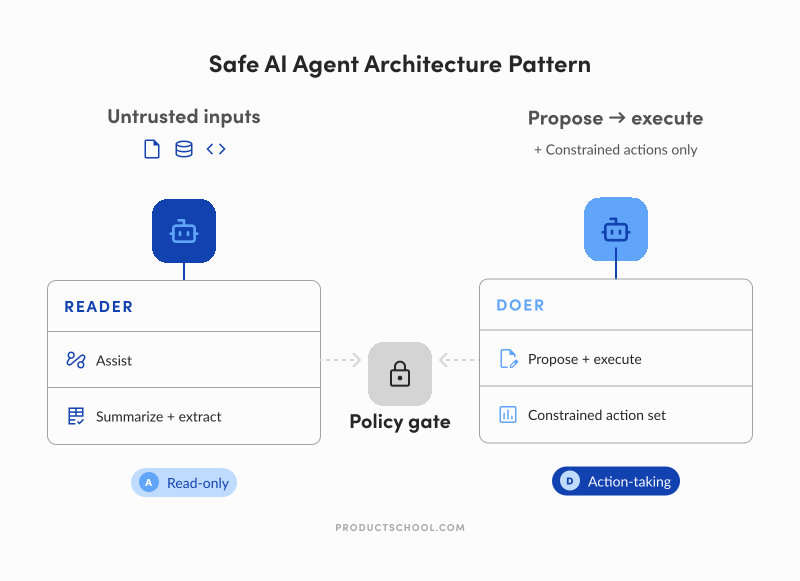
Safer default is to keep action-taking agents away from untrusted inputs, or split the workflow so the “reader” is read-only and the “doer” is tightly constrained.
In other words, don’t let an agent that can take actions also freely read untrusted content. Either keep it read-only when it ingests messy inputs, or split it into two parts: one agent that only reads/summarizes, and another that can act but is locked down to a small set of safe, approved actions.
3. Workflows where rules already work really well
This one is unsexy, but it will save you months.
If a workflow is stable, well-defined, and can be expressed as a clear set of rules without becoming spaghetti, creating an agent often makes things worse, not better. You add cost, unpredictability, and a whole new testing and oversight burden, without getting much upside.
A simple way to think about it is a spectrum:
Use assistants when you need help thinking or drafting.
Use rule-based automation when the steps are clear and repeatable.
Use agents when the workflow is messy, exception-heavy, and keeps breaking your rules.
If you want, I can also tighten the opening into a punchier “hallway” version, or add a short one-paragraph example of a failure mode (the kind that feels painfully real).
4. The underrated failure mode: “human-in-the-loop” becomes a time sink
There’s a version of “responsible agents” that looks safe on paper and fails in practice. It’s where an agent produces work, and humans spend forever correcting it, approving every step, or cleaning up edge cases.
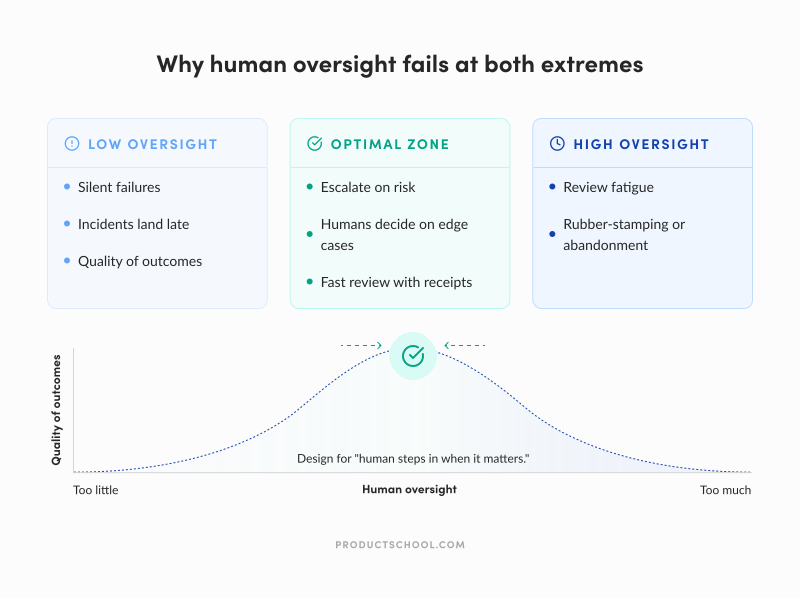
From what I’ve seen, two things tend to happen:
Humans become the bottleneck. If every run needs review, the agent can’t scale; it just turns your team into quality control for a system that was supposed to save time. And when you’re reviewing mostly-correct outputs all day, people start rubber-stamping.
Oversight gets harder as AI gets better. This is the counterintuitive part, so read attentively. When AI is “almost always right,” it becomes economically and psychologically harder to keep people vigilant. New research summarized by Wharton describes this as a “contracting paradox”: to get consistent human oversight, you often have to pay for it because the work feels pointless right up until it isn’t.
And even when you do keep humans involved, you don’t automatically get safety.
Studies on human-in-the-loop decision making show that incorrect AI input can still shift human judgment in the wrong direction, depending on timing and how the process is structured. Automation bias is real, and even explanations don’t reliably fix it.
Don’t design “human in the loop” as “human checks everything.” Design it as “human steps in when it matters.”
Escalate on ambiguity, policy boundaries, or high-impact actions.
Let the agent run end-to-end on low-risk, reversible work.
Make the agent show its receipts (sources, diffs, what it changed) so review is fast and targeted.
What Needs to Be in Place Before Introducing AI Agents
This is where most agent write-ups get fuzzy and product leaders don’t need fuzzy. They need “what do I do on Monday?”
So, a good way to start is by asking “which workflow do we want to make measurably better, and what’s the safest version of autonomy we can ship?”
Clear goals and success metrics that aren’t vibes
The easiest way to keep this grounded is to pick one internal workflow, write down the baseline, and track three things:
Speed/throughput: Does cycle time drop, do fewer tasks get stuck, do you close more of the right tickets per week?
Quality: How often does a human have to rewrite, correct, or escalate? How often does it miss key context?
Trust/usage: Do people keep using it when nobody’s forcing them? Do they opt out? Would they use it again?
If you can’t describe “better” in plain language, agents won’t magically improve product OKRs. You’ll just get a clever AI prototype.
Constraints, guardrails, and “permission design.”
If you let an agent do everything, eventually it will at the worst possible moment. So treat permissions as the product.
A good default is to stage autonomy like this:
Read-only first: search, summarize, draft, propose.
Write second: create tickets, update docs, but with review.
Sensitive actions last: anything irreversible can only be done with explicit approval.
The ProductCon panel discussion gave a relatable example of why this matters. Tanya Littlefield, VP of Growth Marketing at Amplitude, put it bluntly: “I don’t want to push anything from an agent live on our website without getting at least a little bit of human intervention first”. Then she shared the early mishap: “‘Put a button here on the homepage’ and it made the button the entire size of the homepage.”
It’s obviously a simple example, but it proves the point. Autonomy without boundaries gets weird fast.
Observability and feedback loops you can actually operate
Agents fail in a hundred small ways.
If you don’t have logs you can inspect (what it saw, what it decided, what it changed), you can’t debug it, improve it, or govern it. And if you can’t do those three, you have a roulette wheel instead of a product.
Every output should be reviewable.
Ideally, the agent shows its receipts: links, snippets, diffs, and a short explanation of why it made the call. Once you can check thoroughly, you’ll see what aspects of its work you’re able to trust.
Then you need a loop. Humans correct the agent, the system captures those corrections, and the workflow gets tighter over time. This is the boring part, but great AI product managers know it’s where most ROI lives.
Human-in-the-loop is a product decision
With all due respect to great AI promises, I still don’t see the way product teams can “graduate” into full autonomy on all agentic work.
Sometimes, in some segments, you will. But often you won’t and you shouldn’t.
For brand-sensitive, compliance-heavy, or high-impact work, the right steady state is: the agent does 70% of the work, humans own the last 30%. Not because the agent can’t draft, but because humans are the accountability layer.
In her ProductCon AI appearance, Ryan Daly Gallardo, SVP of Product at Dow Jones, described this pattern clearly in their AI summaries experiment: “Every single summary was reviewed by a human editor before going live.” That’s a mature design choice because the system moves fast, and the humans preserve the standard.
A decision framework AI PMs can use to judge agent fit
Agents are expensive autonomy. Use them when autonomy changes outcomes, not when it’s just a fancy way to do stuff
Here’s a mental model product teams can actually use.
The agent spectrum overview
As AI PMs or product team members, your job is not to ask whether AI should be autonomous in general. Your job is to decide how much autonomy is safe and valuable for this product, workflow, and risk level.
Reactive (no autonomy)
Safe, immediate value. No memory, no external actions (for example, a chatbot answer or document autocomplete).Tool-using (assisted autonomy)
Fast ROI, minimal governance needs. The system can call tools or APIs to help complete a task — for example, an assistant that summarizes a document or runs a search.Semi-autonomous (Human-in-the-loop)
High leverage with manageable risk.
The agent can handle multi-step workflows, but a human reviews or approves key outputs — for example, an agent that researches, drafts, and submits a report for review.Fully autonomous (Goal-driven)
Maximum value potential, highest governance need. The agent operates toward a goal with minimal intervention — for example, an agent autonomously coding a fix for a bug report.
Most teams should live in B or C for a long time. That’s where you get real leverage without paying the full risk bill that comes with D.
The “should this be an agent?” test
You can use this as a quick rubric or a simple checklist. The questions are straightforward:
Does this workflow resist rule-based automation?
If a script or rules engine can do it reliably, do that. Agents are for product workflows where rules become brittle, explode in complexity, or constantly break on edge cases.
Is there real multi-step work across tools?
If the task is “write a summary,” you probably don’t need an agent. If the work looks like “pull context, find evidence, draft a recommendation, update artifacts in multiple tools, ask follow-ups, and escalate exceptions,” you might.
Can you define success and catch failure?
If you can’t tell when it’s wrong, you can’t run it safely. That’s where logging, evaluation, and clear “what good looks like” checks stop being optional.
What’s the cost of a bad action?
The higher the downside, the more you constrain the agent and require approvals. This is exactly what security guidance is getting at when it warns against giving models too much freedom and then trusting them blindly.
Will people over-trust the output?
If yes, you’re in automation-bias territory. Design for healthy skepticism: show sources, link evidence, ask the agent to list assumptions, and prompt it to argue the other side before anyone acts.
Should This Be an Agent? Decision Rubric for Product Teams
To use this correctly, try to score each row from 0–2.
Once you finish, add the total. Then use the interpretation guide below.
Dimension | 0 = Agent Not Needed | 1 = Maybe | 2 = Strong Agent Fit | Why This Matters |
Rule-based automation viability | Clear rules handle it well | Some edge cases | Rules break often | Agents shine when logic is messy or unstable |
Multi-step workflow complexity | Single step | Few steps | Many steps across tools | Agents add value when coordination is costly |
Tool interaction required | No tools | One system | Multiple systems | Agents are strongest when orchestrating tools |
Success is measurable | Hard to define “correct” | Partial signals | Clear success metrics | You must detect failure to deploy safely |
Cost of a wrong action | High + irreversible | Medium | Low or reversible | Higher risk → lower autonomy tolerance |
Human over-trust risk | Very likely | Possible | Unlikely | Over-trust creates silent failure modes |
Reversibility of output | Hard to undo | Some rollback | Easily reversible | Agents work best where mistakes are fixable |
Frequency of execution | Rare task | Occasional | Frequent/recurring | Repetition compounds agent ROI |
Input variability | Highly predictable | Mixed | Messy/unstructured | Agents outperform scripts on messy inputs |
Coordination overhead | Minimal | Moderate | Heavy | Agents collapse coordination costs |
Need for judgment | None | Some | High | Agents help when reasoning is required |
Latency tolerance | Must be instant | Moderate | Flexible | Agents often trade speed for reasoning |
Use this table to interpret the score
Total Score | Recommendation |
0–8 | Don’t use an agent. Use scripts, rules, or templates. |
9–16 | Consider the agent in recommendation mode (human decides). |
17–20 | Good fit for an agent with approvals. |
21–24 | Strong agent candidate with guardrails. |
When To Use AI Agents Is Product Team-specific
The teams that get value from agents will be the ones that treat agents like expensive leverage: worth it when they collapse messy, multi-step work into something faster and more consistent; not worth it when they simply add unpredictability to a workflow that already runs fine.
Before you introduce an agent into internal product work, make sure the fundamentals are covered:
Autonomy is earned, not assumed. Start at “recommend” or “act with approval,” then increase autonomy only when outcomes and failure modes are understood.
Success is measurable, not vibes. Track speed, quality, and trust so you know whether the agent is helping—or just producing impressive-looking output.
Guardrails are designed, not implied. Limit tool access, define stop rules, and keep high-impact actions behind explicit approvals.
Humans stay accountable. Agents can do 50–70% of the work, but product judgment doesn’t get outsourced. People still own the decision and the consequences.
Workflows are made legible. If the agent can’t reliably pull the right context and show receipts, you’ll spend more time supervising than saving.
If you do this well, you move with control. You stop shipping “agent demos,” stop scaling brittle behavior, and start using autonomy where it actually changes outcomes.
Product Leadership Certification
Elevate your product strategy and decision-making by integrating AI-driven insights.
Enroll now
Updated: April 27, 2026